Introduction
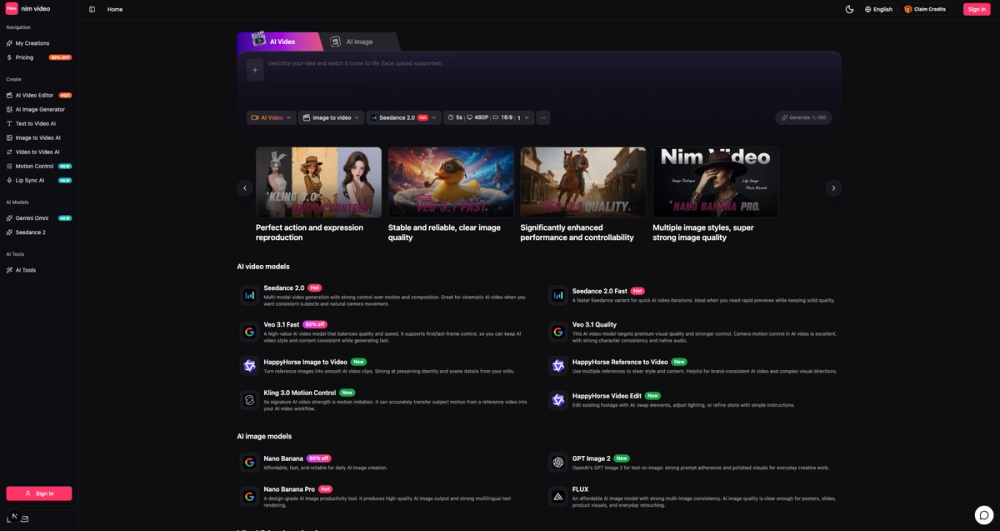
Nim Video is a studio workspace that brings multiple AI video and AI image generation models under one interface. Users can generate video from text prompts, animate reference images, transfer motion from source clips, edit existing footage with AI, and create images - all without switching between separate model platforms. The site lists seven video models (Seedance 2.0, Seedance Fast, Veo 3.1 Fast, Veo 3.1 Quality, HappyHorse Image-to-Video, HappyHorse Reference-to-Video, Kling 3.0 Motion Control) and four image models (Nano Banana, Nano Banana Pro, GPT Image 2, FLUX), plus an inspiration gallery and a built-in video editor. For creators who work across multiple AI models and want to move from prompt to finished asset in one session, Nim Video consolidates the workflow.
Key Features
- Text-to-Video Generation - describe a scene in natural language and generate an AI video clip; face upload is supported for character-driven content
- Image-to-Video - animate a reference image into a video clip while preserving identity and scene details (HappyHorse Image-to-Video)
- Reference-to-Video - use multiple reference images to steer style, subject, and motion in the generated output
- Motion Control - transfer subject motion from a reference video into a new AI-generated scene (Kling 3.0)
- Video Editing - swap elements, adjust lighting, or refine shots in existing footage using AI instructions (HappyHorse Video Edit)
- Lip Sync AI - synchronize lip movement in generated or uploaded video
- AI Image Generation - four models ranging from fast daily-use (Nano Banana) to design-grade output with multilingual text rendering (Nano Banana Pro), plus OpenAI's GPT Image 2 and FLUX
- Inspiration Gallery - browse sample video and image outputs from the Nim Video community for starting-point ideas
- Multiple AI Models in One Studio - switch between Seedance, Veo, HappyHorse, Kling, Gemini Omni, GPT Image 2, FLUX, and Nano Banana without leaving the workspace
Use Cases
Content creators producing short-form video for social media can generate a clip from a text prompt, then refine it with motion control or lip sync without exporting to a separate editor. The ability to switch models mid-project - using Seedance for cinematic shots and Veo Fast for quick previews - lets creators compare outputs and choose the best result without managing multiple subscriptions.
Design teams that need brand-consistent video can use the Reference-to-Video feature to steer style and subject from reference images, ensuring that generated clips match established visual guidelines. The HappyHorse Reference-to-Video model is specifically highlighted for brand-consistent AI video and complex visual directions.
Video editors working with existing footage can use the AI video editor to make targeted changes - replacing elements, adjusting lighting, or applying style shifts - through natural-language instructions rather than manual frame-by-frame editing. This is useful for quick revisions that would otherwise require reopening a timeline editor.
Pricing
The site mentions a pricing page with a 30% discount promotion and a "Claim Credits" offer for new users. Specific plan tiers, credit allocations, and monthly prices are not visible on the homepage. The Veo 3.1 Fast model is listed at 50% off and Nano Banana at 60% off, suggesting per-model pricing or credit-based usage. Users should visit the Nim Video site to review current pricing before committing.
User Experience and Support
The workspace uses a dark studio interface with a sidebar for switching between video and image modes, model selection, and tool access. The generation flow follows a prompt-describe-generate pattern, with model-specific options for resolution, duration, and aspect ratio (e.g., Seedance 2.0 defaults to 5 seconds, 480P, 16:9). An inspiration gallery provides sample outputs for users who want a starting point rather than writing a prompt from scratch.
The site includes a FAQ section covering model selection, end-to-end workflow, image-to-video conversion, and whether AI video still needs human review. Specific support channels such as email, live chat, or a help center are not prominently visible on the fetched page.
Technical Details
Nim Video runs as a web application. The platform routes generation requests to multiple AI models: Seedance 2.0 and Seedance Fast (multi-modal video with motion control), Veo 3.1 Fast and Quality (first/last-frame control, camera motion, native audio), HappyHorse (image-to-video, reference-to-video, video editing), Kling 3.0 (motion imitation), Gemini Omni (newly listed), Nano Banana and Nano Banana Pro (image generation), GPT Image 2 (OpenAI text-to-image), and FLUX (multi-image consistency). The site supports English. No API access, browser extensions, or third-party integrations are mentioned.
Pros and Cons
Pros
- Multiple AI video and image models accessible from a single workspace
- Image-to-video, reference-to-video, and motion control cover the main video generation workflows
- Built-in video editor for AI-assisted revisions to existing footage
- Inspiration gallery lowers the barrier for users who need prompt ideas
- Lip sync and motion control add direction-specific capabilities beyond basic generation
Cons
- Pricing details are not visible on the homepage - users need to visit the site to compare plans
- Specific support channels beyond the FAQ are not clearly listed
- No mention of API access, browser extensions, or integrations with editing software
- Credit-based or per-model pricing structure requires users to understand model costs before committing
FAQ
What is Nim Video?
Nim Video is a studio workspace that combines multiple AI video and AI image generation models in one interface. Users can generate video from text, animate images, transfer motion from reference clips, edit footage with AI, and create images - switching between models like Seedance, Veo, HappyHorse, Kling, and GPT Image 2 without leaving the platform.
Can I turn a generated AI image into a video on Nim Video?
Yes. The HappyHorse Image-to-Video model takes a reference image and generates a smooth video clip that preserves identity and scene details from the still. The site FAQ confirms this as a supported workflow.
Is Nim Video only for text-to-video generation?
No. The platform supports text-to-video, image-to-video, reference-to-video (using multiple reference images), video-to-video, motion control (transferring motion from a reference clip), video editing, and lip sync. It also includes four AI image generation models.
How do I choose the right AI model on Nim Video?
The site provides model descriptions that match each model to a use case: Seedance 2.0 for cinematic video with consistent subjects, Seedance Fast for quick previews, Veo 3.1 Fast for balanced quality and speed, Veo 3.1 Quality for premium output with camera control, HappyHorse for image-to-video and reference-guided generation, and Kling 3.0 for motion imitation. The FAQ addresses model selection directly.
Does AI video still need human review?
The site includes this as a FAQ question, which suggests the answer is yes - AI-generated video may still require review for consistency, accuracy, or quality before final use. Users should expect to review and refine output rather than treating it as final by default.
What does Nim Video cost?
Pricing details are not fully visible on the homepage. The site mentions a 30% discount promotion, per-model discounts (Veo 3.1 Fast at 50% off, Nano Banana at 60% off), and a "Claim Credits" offer. Users should check the Nim Video site for current plan tiers and credit allocations.
Conclusion
Nim Video consolidates a wide range of AI video and image generation capabilities into a single studio workspace, which is its clearest practical advantage. Having Seedance, Veo, HappyHorse, Kling, and multiple image models under one roof - with motion control, lip sync, and video editing alongside generation - covers the main creative workflows that typically require separate tools. The main uncertainty is pricing, which is not detailed on the homepage. For creators who regularly switch between AI models and want to compare outputs in one session, the Nim Video site is worth exploring.