Introduction
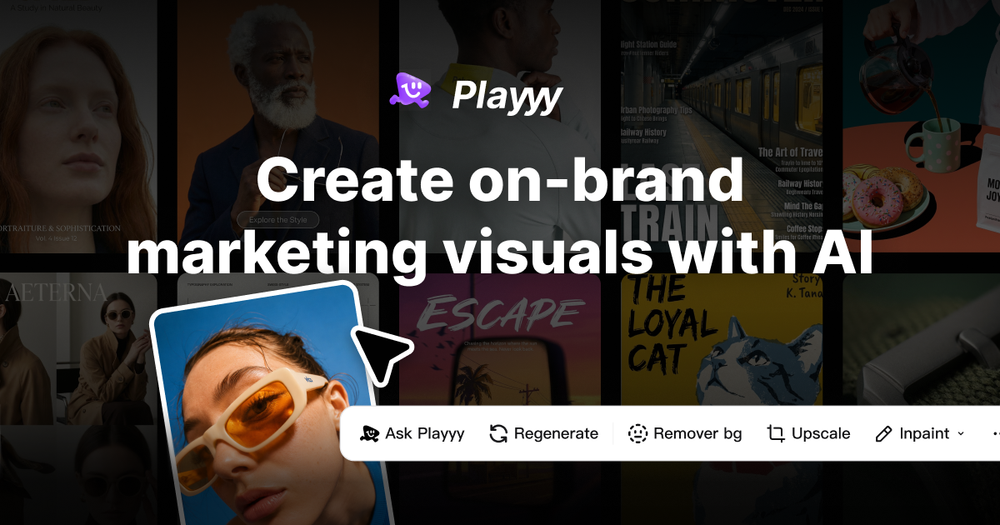
Playyy is a browser-based AI image editor and generator that targets marketers, content creators, and ecommerce operators who need to produce visual assets without traditional design software or agency involvement. The platform combines text-to-image generation with an editable canvas that allows users to modify elements, adjust styles, and export channel-ready formats from a single interface.
The tool positions itself as an alternative to stock photo libraries and expensive photoshoots, promising to compress what traditionally takes days into single browser sessions. With a free tier available and no credit card required to start, Playyy appears designed to lower the barrier to professional-quality visual production for teams without dedicated design resources.
Key Features
AI Image Generator Users describe visuals in plain language and Playyy's AI produces photorealistic or illustrated outputs ready for ads, landing pages, and social media. The system supports GPT Image 2 and Nano Banana models, with options to generate scenes, products, and campaign concepts rather than browsing stock libraries.
Background Remover The tool isolates subjects from backgrounds with edge detection handling complex materials like hair, mesh, and transparent objects. For ecommerce use cases, this produces the clean cutouts necessary for marketplace listings and composite images.
Object Remover and Inpainting Users can remove unwanted elements from images or rebuild specific areas through AI inpainting. This handles corrections like removing hanger shadows, size tags, or distracting background elements without regenerating the entire image.
Image Upscaler and Enhancer The Visual Enhancer brings images to 2× or 4× resolution without blurring, addressing platform requirements like Amazon's 1,000px minimum for zoom activation and Shopify's recommended 2,048px for hero slots.
Image Expander Rather than cropping and losing composition, the Image Expander adapts a single hero visual to multiple aspect ratios-1:1 for Instagram feed, 9:16 for Stories and TikTok, 16:9 for YouTube banners, 1.91:1 for LinkedIn-by reading the scene's spatial logic and filling extended areas naturally.
Style Transfer Users can apply consistent visual treatments across campaign assets by referencing existing images. The system extracts color palettes, tone, and composition style to maintain brand coherence without manual adjustment of each output.
Editable Canvas with Layer Control Every AI-generated result lands on a canvas where elements remain modifiable. Users can click specific components, describe changes in plain language, and have the AI apply edits to targeted areas while preserving the rest of the composition.
Use Cases
Ecommerce Product Photography Starting from supplier JPEGs, phone shots, or warehouse photos, Playyy's workflow removes backgrounds, generates scene variations (studio minimalist, lifestyle settings, seasonal contexts), upscales to marketplace specifications, and exports compliant images for Amazon, Shopify, and social channels-all in one session.
Campaign Visual Creation Marketing teams can move from a single campaign brief to complete asset sets spanning social posts, display ads, email headers, and print materials without rebuilding the creative direction for each channel format. The Image Expander produces multiple ratios from one source image.
Social Media Content Production Content managers can generate, edit, and resize visuals for multiple platforms without switching between design tools. The Style Transfer feature helps maintain grid coherence and brand consistency across posts.
Event and Promotional Materials The platform supports creation of posters, flyers, invitations, and digital invitations without requiring design software expertise or external agency coordination.
Print-Ready Assets Through 2×-4× upscaling and format adaptation, Playyy extends to print outputs including A4 flyers, A3 posters, and banner sizes using the same creative direction developed for digital campaigns.
Design Iteration and Revision When stakeholders request changes-different backgrounds, adjusted product placement, updated copy-the editable canvas allows direct modification without returning to external designers or starting from scratch.
Pricing
Playyy operates on a freemium model with three general tiers:
Free Plan
- Monthly allowance of AI generations, background removals, and edits
- No credit card required to start
- Core feature access with limits
Paid Plans
- Higher monthly limits on generations and edits
- Priority processing speed
- Advanced features unlocked
- Save up to 65% with annual billing versus monthly
Commercial Rights
- All users can use designs commercially per Terms of Use
- Paid subscribers receive full commercial rights to output
Specific pricing for monthly, yearly, and lifetime tiers was not visible in source materials. The website promotes starting free and upgrading when ready, suggesting usage-based progression rather than upfront commitment.
User Experience and Support
No Design Experience Required The interface accepts plain language descriptions rather than requiring software proficiency. Users brief campaigns by describing audience, mood, channel, and objective-the AI handles rendering based on text direction rather than manual design tools.
Browser-Based Workflow All processing occurs within the browser, eliminating software installation and enabling cross-platform access. The infinite canvas allows multiple designs within a single project session.
Educational Resources The website maintains tutorials, prompt guides, customer stories, and use case documentation. Resources cover specific workflows like AI product photography, campaign visual creation, and platform-specific format requirements.
Community and Feedback User testimonials from social media managers, ecommerce strategists, and creative directors highlight the platform's utility for maintaining visual consistency and accelerating production timelines.
Support Channels Email support is available at hello@playyy.ai. Documentation and FAQ sections address common questions about functionality, commercial usage, and export capabilities.
Technical Details
Supported Models
- GPT Image 2
- Nano Banana
- Access to top image generation models unlocked on paid tiers
Export Formats
- PNG and JPG at high resolution
- PNG supports transparency for cut-out assets
- Resolution support for print and digital requirements
Platform Integrations
- Shopify (native ecommerce workflow support)
- Chrome browser optimization
Format Specifications Supported
- Amazon: 1,000px minimum (pure white background RGB 255,255,255)
- Shopify: 2,048px recommended for hero slots
- YouTube banners: 2560×1440px with 1546×423px safe zone
- LinkedIn: 1.91:1 for link posts, 1:1 for standard updates
- Instagram: 1:1 or 4:5 for feed, 9:16 for Stories/Reels
File Input Requirements
- Works with JPEG, phone shots, supplier images, warehouse photos
- RAW files not required
- Background removal handles difficult edges including hair, mesh, transparent materials
Upcoming Features
- Image to video conversion (marked as "Coming soon")
- PPT and document generation from prompts
Pros and Cons
Pros
- Consolidates multiple image tools (generation, editing, upscaling, background removal) into single interface
- Free tier allows genuine evaluation before financial commitment
- No design software expertise required-natural language drives the workflow
- Image Expander intelligently adapts compositions to multiple aspect ratios rather than cropping
- Editable canvas preserves modifiability after generation, reducing rework cycles
- Handles difficult edge cases in background removal (hair, mesh, transparency)
- Ecommerce-specific workflows with marketplace compliance built in
- Style Transfer maintains brand consistency across asset batches
- Fast turnaround compared to traditional photoshoots and agency timelines
- Commercial usage rights included, even on free tier
Cons
- Pricing specifics not prominently displayed-users must inquire or discover through usage
- Monthly generation limits may constrain high-volume operations
- Free tier processing speed likely deprioritized versus paid subscribers
- Browser-based workflow requires internet connectivity
- AI generation quality varies with prompt specificity and model limitations
- Complex materials (glassware, chrome, sheer fabric) may require additional review passes
- No native desktop application for offline work
- Image to video and document generation features not yet available
- Platform primarily optimized for Chrome; other browsers may have compatibility issues
FAQ
What makes Playyy different from stock photo libraries? Stock libraries offer pre-existing images requiring browsing and licensing negotiations. Playyy generates custom visuals from your specific brief-scene descriptions, product placements, and campaign concepts-producing unique assets rather than selecting from available inventory.
Can I use Playyy without any design background? Yes. The platform accepts natural language descriptions. You describe what you want-mood, subject, composition, color treatment-and the AI renders accordingly. No proficiency in Photoshop, Illustrator, or similar tools is required.
How does the Image Expander work without distorting compositions? Rather than stretching or cropping, the Image Expander reads the spatial logic of your source image and generates new content to fill extended areas. This produces aspect ratio variations that look composed rather than distorted, adapting one creative direction to multiple channel formats.
What file formats can I export from Playyy? PNG and JPG at high resolution. PNG exports support transparency, which is essential for cut-out product images and design assets that need to overlay on different backgrounds.
Can I use Playyy-generated images for commercial purposes? Yes. Free users can use designs commercially under the Terms of Use. Paid subscribers receive full commercial rights to their output. Review the specific terms for any usage restrictions applicable to your industry or scale.
How does Playyy handle product photography for ecommerce? Upload any source photo-supplier JPEG, phone shot, or warehouse image. Background Remover isolates the product. Object Remover cleans residual elements like shadows or tags. Style Transfer and AI Image Generator place the product in new contexts (studio, lifestyle, outdoor). Image Upscaler brings resolution to marketplace requirements. Image Expander produces every required format. The entire workflow runs in one session.
What's the difference between the free and paid plans? Free plans include a monthly allowance of AI generations, background removals, and edits. Paid plans increase these limits, add priority processing speed, and unlock advanced features. Annual billing offers up to 65% savings versus monthly.
Can I edit an image after the AI generates it? Yes. Every output lands on an editable canvas. Click any element and describe the change you want. The AI applies modifications to specific areas while preserving the rest of the composition. You can also inpaint areas or upscale the final image.
Does Playyy work with existing brand guidelines? Style Transfer allows you to reference existing images and apply their visual characteristics-color palette, tone, composition style-to new assets. For tighter control, describe your brand's visual characteristics in the brief, and the AI uses those constraints across outputs.
What platforms and browsers does Playyy support? Playyy runs in modern web browsers with particular optimization for Chrome. The tool is browser-based, requiring internet connectivity, with no native desktop application currently available.
Conclusion
Playyy addresses a genuine friction point in modern marketing workflows: the gap between needing professional visual assets and lacking dedicated design resources or agency budgets. By combining generation, editing, and format adaptation in a single browser interface, it reduces tool-switching and accelerates production timelines.
The platform's strongest differentiator is the editable canvas that preserves modifiability after generation-addressing a common pain point where AI tools produce impressive first drafts but resist refinement. The Image Expander's intelligent aspect ratio adaptation similarly solves practical problems that simple cropping cannot address.
For ecommerce operators specifically, the workflow from raw supplier photos to marketplace-compliant listings appears genuinely useful. The ability to start from imperfect source material and produce multiple scene variations, resolutions, and formats in one session compresses timelines that traditionally required photographers, editors, and coordination.
However, prospective users should note the limitations: generation limits on all tiers, browser-only access, and AI output quality that varies with prompt specificity. The platform excels at producing campaign-ready visuals from clear briefs but may struggle with highly specific or nuanced creative directions.
The free tier provides adequate scope for evaluation, and the no-credit-card-required signup lowers risk for teams considering the tool. For marketers, content managers, and small ecommerce operations seeking to reduce dependency on stock libraries and external designers, Playyy offers a viable path to faster visual production-provided expectations align with AI-assisted rather than AI-replaced creative work.
Before committing to paid tiers, test the free allowance with your specific use cases to verify output quality meets your brand standards and workflow needs.