Introduction
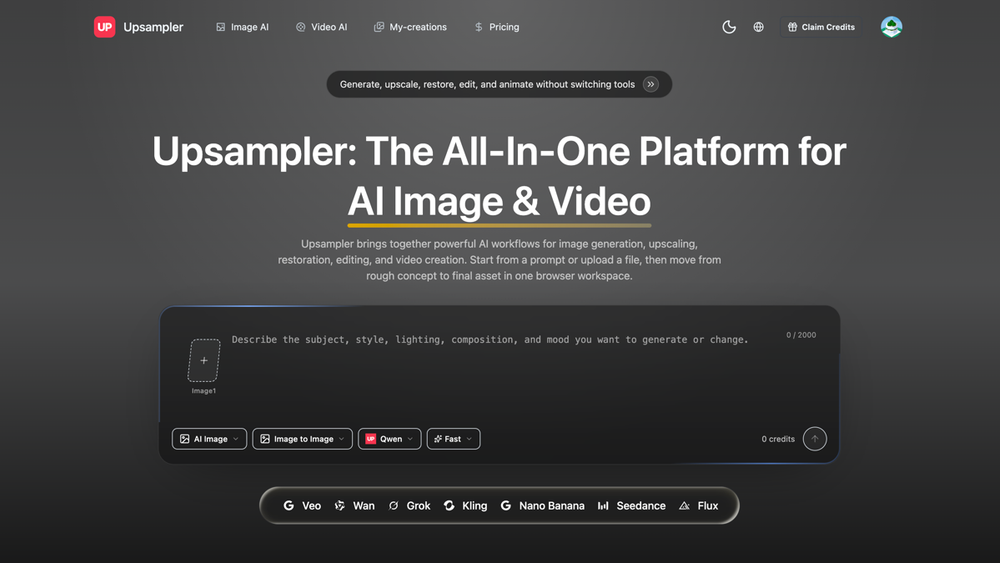
Upsampler is positioned on its public site as an AI image and video workflow stack for creators, marketers, and product teams who need generation, enhancement, editing, and export in one browser-based flow. The homepage emphasizes practical creative work-ads, thumbnails, product scenes, and motion from stills-rather than a single narrow tool. Anyone comparing options should open Upsampler and confirm current pricing, credit rules, and output rights before production use.
Key Features
- Generate on-brand image concepts from text prompts or reference images, including ads, thumbnails, portraits, covers, and product scenes.
- Upscale, restore, and edit stills so teams can improve resolution and clean up assets without leaving the same workflow.
- Move from strong stills into motion using text-to-video or image-to-video paths while keeping composition readable.
- Run image and video workflows from the browser: pick a workflow, add prompts or references, generate, and export.
- Prepare polished exports for social, product pages, campaign review, or handoff without a separate finishing tool.
- Combine generation, enhancement, editing, and export so marketers and operators spend less time switching apps.
Use Cases
Teams that ship creative for ads, social, or product pages can use Upsampler to draft visuals quickly, then refine or upscale before export. The public copy highlights turning a strong still into short motion for campaigns where video variants matter but full production budgets do not.
Marketers and creators comparing AI creative stacks can read how the site groups image generation, restoration, editing, and video in one place. That framing suits workflows where the same brand assets need both static and motion formats.
Product and growth teams evaluating tools should still run their own trials: public pages describe capabilities at a high level, but volume limits, model behavior, and commercial usage terms need confirmation in account settings or checkout.
Pricing
The fetched homepage includes pricing-related language tied to credits, plans, or usage (exact wording varies by page version). Readers should confirm current tiers, how credits consume per image or video job, billing cycle, and whether free exploration differs from paid export quality on the official site.
User Experience and Support
The site is structured around choosing a workflow first-image generation, upscaling, restoration, editing, or video-then adding prompts and references. That step-by-step layout helps first-time visitors understand what to try without reading a long spec sheet.
Support signals on the public pages may include help or contact routes; depth of documentation and response channels should be verified for your team's support expectations before relying on the product for client work.
Technical Details
Upsampler is presented as a browser-based workflow rather than a desktop-only install. Integration mentions, API access, and file-format limits are not always spelled out on marketing copy alone. Teams with strict stack requirements should check the live product or docs for export formats, asset handling, and any integration hooks they need.
Pros and Cons
Pros
- One site covers still generation, enhancement, editing, and video-style workflows.
- Clear workflow steps on the homepage reduce guesswork for new users.
- Useful for teams that need both images and short motion from the same creative direction.
- Export-oriented messaging fits social, product, and campaign review use cases.
Cons
- Marketing pages may not list every model option, cap, or rights rule.
- Pricing and credit math should be verified at signup, not inferred from snippets alone.
- Technical depth for enterprise integrations may require direct product exploration.
- Output quality and consistency still need hands-on validation for your brand standards.
FAQ
What is Upsampler based on the public website?
The site presents Upsampler as an AI image and video workflow product aimed at creators, marketers, and product teams, combining generation, enhancement, editing, and export.
Who is Upsampler most relevant for?
It appears most relevant for people who need on-brand visuals and optional motion from the same tool chain-ads, thumbnails, product imagery, and campaign assets-without juggling many separate apps.
What workflows does the site describe?
Public copy references image generation, upscaling, restoration, editing, text-to-video, and image-to-video, plus exporting results for social, product pages, or team review.
How should buyers think about pricing?
Treat homepage pricing or credit mentions as a starting point only. Confirm plan boundaries, renewal terms, and per-job credit use in the live pricing or account flow.
What should teams verify about support?
Look for help docs, contact options, or onboarding material linked from the site. If those are thin, budget extra time for self-serve troubleshooting.
Are technical requirements clear from marketing pages alone?
Browser-based positioning is clear; APIs, integrations, and detailed format support may need confirmation in product docs or trials.
What is the main caveat when evaluating from the homepage only?
Public copy explains positioning well but may omit usage caps, commercial rights, and model-specific behavior. A short trial on your actual creative tasks is the safer way to judge fit.
Conclusion
Upsampler is worth a closer look when your team wants image and video-style workflows in one browser experience. Use Upsampler to confirm current pricing, support, and rights, then validate output on the campaigns and formats you run day to day.