Introduction
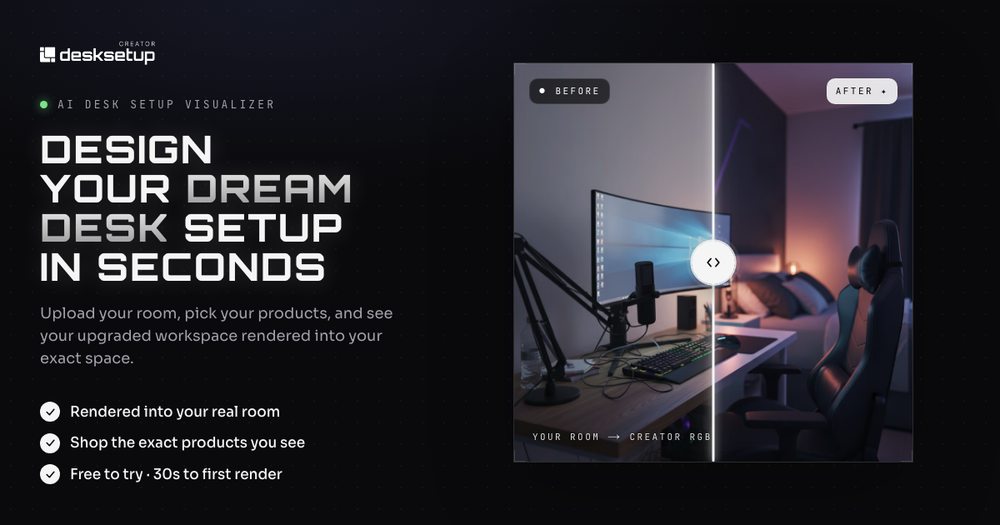
Desk Setup Creator is presented as an AI desk setup visualizer: upload a photo of your room, choose styles or catalog products, and see photoreal-style renders of a workspace in your actual space. The site targets people planning home offices, gaming rigs, or creator desks who want to preview layout and aesthetics before buying furniture and gear. Sign-in and paid limits are not fully detailed on the single homepage captured here, so try the free flow and read current terms before relying on it for major purchases.
Key Features
- Room upload from a phone photo or image file, with copy that AI maps layout, light, and dimensions from one shot.
- Style presets such as Minimal, Gaming, Productivity, Luxury, cozy, and developer-oriented examples, plus option to build from a product catalog.
- Product placement at scale: desks, monitors, lighting, and related gear that can be moved, rotated, or swapped with regeneration.
- Before-and-after style outputs and examples showing decluttered, dual-monitor, and ambient-lighting scenarios.
- Spatial understanding messaging: walls, footprint, and existing furniture considered rather than a generic blank box.
- Fast iteration claims (many variations per minute) for comparing looks without physical assembly.
Use Cases
Remote workers and students furnishing a first dedicated desk may use the tool to see whether a standing desk, ultrawide monitor, or cable-minimal layout fits the room photo they already have.
Gamers and streamers evaluating RGB lighting, curved monitors, or acoustic panels can compare preset vibes against the same room instead of imagining from product thumbnails alone.
Anyone who has returned mismatched furniture or worried about chair clearance and monitor height gets a narrative on the page about reducing buyer's regret by visualizing ergonomics and lighting before spending.
Pricing
Marketing copy emphasizes "free to try" and "no card required" for getting a first render in about thirty seconds. A full subscription grid, per-render pricing, or enterprise licensing was not visible in the fetched homepage alone. Confirm whether sign-in unlocks saved boards, catalog SKUs, or export rights on the live site before budgeting.
User Experience and Support
The flow is described as three steps-upload room, choose style or products, receive generated setup-with emphasis on no design skills required. Examples and draggable before/after dividers are used as social proof. Dedicated help center, contact email, or documentation links were not prominent in the evidence used for this profile; plan on in-product exploration and any account settings after sign-in.
Technical Details
The product is browser-based AI rendering layered onto user-uploaded room photos, with catalog-backed product placement. No API, plugin, or integration list appeared in the fetched material. Render accuracy, supported image formats, and privacy handling for room photos should be verified in product policies and a hands-on test upload.
Pros and Cons
Pros
- Clear problem framing for people who shop desk gear online without seeing it in their room.
- Presets plus catalog placement address both quick inspiration and specific product swaps.
- Before/after examples make the value proposition easy to grasp quickly.
Cons
- Pricing beyond a free trial is not spelled out on the captured page.
- Support and data-retention details for room photos are thin in the available evidence.
- Real-world fit still depends on photo quality and how faithfully AI estimates dimensions.
FAQ
What is Desk Setup Creator?
The public page describes an AI-powered setup designer that visualizes desks, monitors, chairs, and lighting inside a photo of your real room.
Who is it for?
It appears aimed at home office planners, gamers, developers, and creators who want to preview workspace upgrades before purchasing hardware and furniture.
How does the workflow start?
You upload a room image, pick a style preset or catalog products, then view generated renders you can iterate, swap, and share according to on-page copy.
Is there a free way to try it?
The site states you can try it free with no card required and reach a first render in roughly thirty seconds; confirm current limits after sign-in.
Can you use real products in the visualization?
Copy mentions building from real products in a catalog and placing them at scale with move and swap controls.
What should you verify before buying furniture based on a render?
Check measurement accuracy, lighting in your actual room, and return policies for gear you order; renders are planning aids, not guaranteed fit specifications.
Does the site document APIs or team features?
No developer API or team workspace details were visible in the homepage evidence used here.
Conclusion
Desk Setup Creator, as described on desksetupcreator.com, helps visualize desk setups inside your own room photo using AI renders and catalog placement. It suits shoppers who want a clearer picture before committing to desks, monitors, and lighting. Start with the free try flow, then confirm pricing, support, and photo privacy on the live product before large purchases.