Introduction
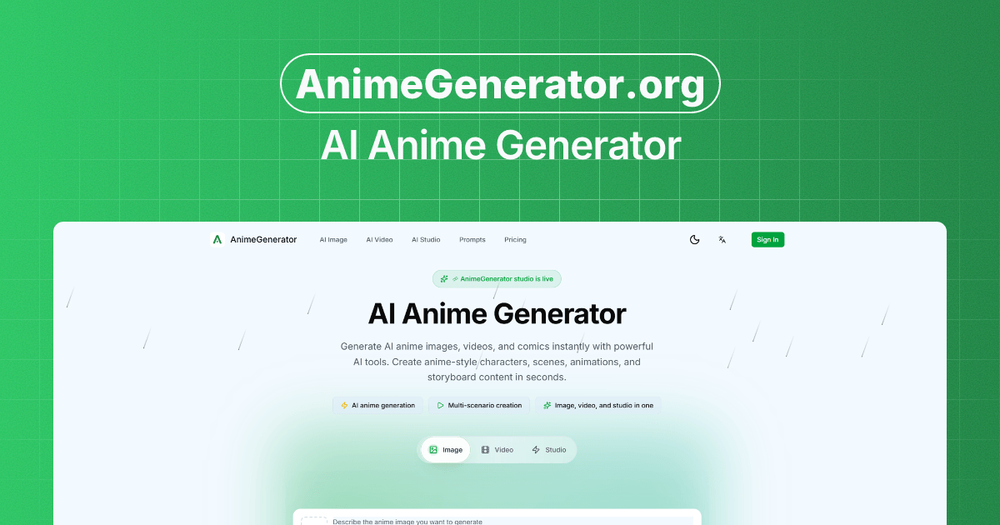
AnimeGenerator is an AI tool for creating anime-style images, videos, and motion comic assets from prompts, references, and dedicated creation modes. The public site positions it as a production workspace for characters, scenes, storyboards, voice, lip sync, subtitles, and exports across vertical and landscape formats. It is best suited for creators evaluating AI-assisted anime content production, while buyers should verify credit usage, rights, output quality, and plan limits before committing.
Key Features
- Prompt-based anime image generation with model selection, aspect ratio choices, optional reference images, and refinement.
- Separate image, video, and studio workflows for anime visuals, short clips, reels, episodes, and motion comic scenes.
- Story scripting that can generate plot arcs and scenes from user prompts.
- Storyboard and shot design tools for creating shot lists and composition guides.
- Character library features for reusable character sheets and more consistent recurring visuals.
- AI voice, lip sync, auto pacing, captions, and multi-format export for creator and social video workflows.
Use Cases
AnimeGenerator appears useful for creators who need anime-style visual concepts quickly. The AnimeGenerator homepage shows examples covering character portraits, cinematic scenes, chibi visuals, retro anime styling, vertical formats, and reference-driven image generation. That makes it a practical candidate for ideation, social visuals, story thumbnails, and early concept art.
The product also serves motion comic and short-form video workflows. Public copy mentions story scripting, storyboard creation, shot design, reusable characters, voice, lip sync, subtitles, and export formats for reels, shorts, episodes, and motion comic scenes. Those signals suggest a workspace for creators who want structure across a sequence, not just a single standalone image.
Teams using AnimeGenerator for commercial or client-facing content should treat the platform as something to test before standardizing. The site describes private videos, no-watermark options, commercial usage rights on higher plans, and priority support on larger tiers, but each of those details depends on plan selection. A careful evaluator should check whether the outputs, policies, and resolution limits match the intended publishing channel.
Pricing
AnimeGenerator offers free access, paid monthly or yearly plans, and one-time credit packages. The pricing page lists a Free plan with limited credits, starter image generation, basic video models for short clips, up to 5-second video generation, up to 480p export, 1 concurrent job, standard queue, and community support. Paid plans shown in the evidence include Basic, Pro, and Ultimate tiers with monthly credit allowances, GPT Image 2 and Nano Banana 2 image generation, video models including Seedance, Veo, and Kling, higher resolutions depending on model, more concurrent jobs, private videos, and expanded support or access. Extra credit packs are available for paid subscribers, and the fetched copy says package credits are valid for 1 month.
User Experience and Support
The visible workflow is straightforward: write the image prompt, choose the model and ratio, add references if needed, then generate and refine. The site also includes an inspiration area with examples and prompt text, which can help users understand how detailed anime prompts are structured and how different looks may be described.
Support signals are visible in the pricing content. The free plan lists community support, credit packs mention standard support, the Ultimate plan mentions priority support, and the pricing page includes a contact email for questions. Users should still confirm response expectations, refund rules, content policy boundaries, and what happens when a generation fails or consumes credits unexpectedly.
Technical Details
AnimeGenerator is presented as a web-based AI generation platform with image, video, and studio modes. Visible technical and model-related signals include GPT Image 2, Nano Banana 2, video models such as Seedance, Veo, and Kling, audio-video sync for avatar workflows, export resolution limits, concurrent generation jobs, generation queues, private video settings, watermark controls, and Stripe payment processing.
The fetched pages do not clearly show an API, SDK, desktop app, plugin, or self-hosted deployment option. Users with production requirements should verify export formats, maximum duration, model-specific resolution limits, privacy settings, content ownership terms, and whether generated files work smoothly in their editing or publishing pipeline.
Pros and Cons
Pros
- Focused specifically on anime images, videos, and motion comics.
- Includes visible workflow steps for prompt writing, model choice, ratios, references, generation, and refinement.
- Production-oriented features cover scripting, storyboards, characters, voice, lip sync, subtitles, and multi-format export.
- Pricing details include credit counts, free access, subscriptions, extra credit packages, and support levels.
- Example prompts and visuals give evaluators a clearer sense of possible output directions.
Cons
- Users must test output consistency and style quality for their own characters and stories.
- Some important options, such as no watermark, private videos, commercial usage rights, and priority support, appear tied to paid tiers.
- Extra credit packages expire after 1 month and are only available to paid subscribers, according to the pricing copy.
- No API or plugin workflow is clearly visible in the fetched evidence.
- Credit-based AI generation can make real project costs hard to estimate until users test typical workloads.
FAQ
What is AnimeGenerator?
AnimeGenerator is an AI anime generation platform for creating images, videos, and motion comic content. The site describes dedicated modes for characters, scenes, storyboards, and preview-ready anime assets.
Who should consider using AnimeGenerator?
It appears best suited for solo creators, storytellers, motion comic makers, short-form video producers, and small teams that need anime-style visuals or scene sequences. It may also be useful for early concept development before manual editing or production work.
What can users generate with AnimeGenerator?
The public site shows anime images, short videos, motion comic scenes, storyboards, character assets, voice and lip-sync workflows, subtitles, and exports for vertical or landscape formats. Exact output limits depend on the selected plan and model.
Does AnimeGenerator have a free plan?
Yes. The visible pricing page lists a Free plan with limited free credits, starter image generation, basic short video models, up to 5-second video generation, up to 480p export, 1 concurrent generation job, standard queue, and community support.
What are AnimeGenerator credits used for?
The site uses credits for generation activity, including image and video workflows. The exact cost per output is something users should verify inside the product, especially if they plan to create longer videos, repeated revisions, or large batches.
Can AnimeGenerator be used for commercial projects?
The fetched pricing content mentions commercial usage rights on higher paid plans. Users should confirm the current terms, plan requirements, restrictions, and whether their intended commercial use is covered before publishing client or revenue-generating work.
Does AnimeGenerator support consistent characters?
The site lists a character library and reusable character sheets, and it positions the tool around more consistent visuals for anime production. Users should test consistency with their own characters, poses, and scene changes before relying on it for a series.
What support options are visible?
The pricing page mentions community support, standard support, priority support on the highest tier, and a contact email for questions. Users should check response times and support scope if AnimeGenerator will be part of a regular production process.
Conclusion
AnimeGenerator offers a focused AI workspace for anime-style images, videos, and motion comics, with visible attention to prompts, characters, storyboards, voice, lip sync, and export formats. The site provides detailed pricing and feature signals, making it easier to compare plans before testing. The main next step is practical evaluation: confirm style control, credit usage, commercial rights, and export quality against the kind of content you actually want to produce.