Introduction
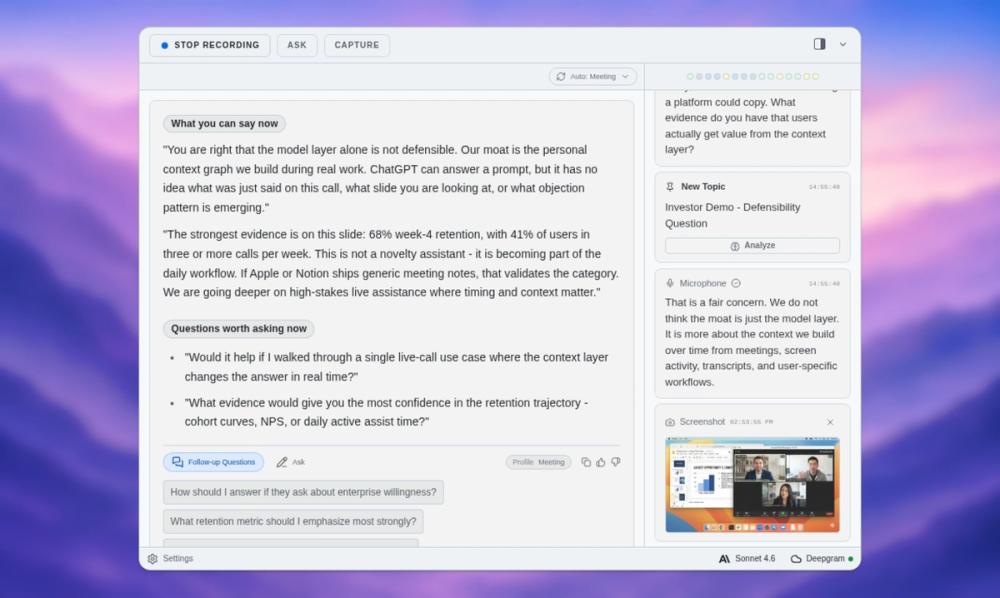
ExtraBrain is a local-first desktop AI copilot designed for live interviews, meetings, lectures, and research conversations. Available for Mac today (with Windows and Linux planned), the app runs alongside video call platforms and coding interview environments, providing real-time transcription, screen-aware context, structured answer suggestions, and session memory. A core differentiator is its local-first approach: transcripts, prompts, and notes stay on your Mac by default, and the app supports on-device Gemma 4 AI alongside bring-your-own (BYO) provider options such as OpenAI, Anthropic, and Claude. For anyone who regularly faces high-pressure live conversations, ExtraBrain offers a private thinking layer - though the ethical considerations around using AI assistance during interviews deserve careful attention.
Key Features
- Live Transcription - real-time transcript capture during interviews, meetings, lectures, and research calls, using local Parakeet transcription or optional Deepgram
- Screen-Aware Context - captures screenshots and selected context during live sessions to ground AI suggestions in what is actually being discussed
- Structured Answer Suggestions - turns coding, system design, and behavioral prompts into clarifying questions, baselines, tradeoffs, and follow-up points
- Session Memory - maintains saved facts and follow-up notes while the call is still active, so context does not fade after the session ends
- Local Gemma 4 On-Device AI - runs AI inference locally when Gemma 4 is installed and compatible with the Mac hardware, with no external provider fees for those requests
- BYO Provider Support - connect OpenAI, Anthropic, custom OpenAI-compatible endpoints, Claude Subscription, or Codex Subscription modes using your own accounts and API keys
- Invisible Mode - designed to stay hidden from screen sharing and screen recording on major video call platforms while remaining accessible on your own Mac
- Post-Session Summaries - generates action items, edge cases, unresolved risks, and review-oriented feedback before session context fades
Use Cases
Engineering candidates preparing for live coding interviews, LeetCode-style prompts, and system design rounds can use ExtraBrain to summarize the prompt, identify edge cases, and outline a baseline approach before starting. The structured answer suggestions are particularly relevant for the fast-paced, technical nature of coding interviews where context moves faster than notes.
Meeting leads and product managers running recurring calls can extract decisions, risks, owners, and follow-ups in real time, rather than relying on post-meeting recollection. Customer research teams can flag pain points and quotable feedback during live conversations, feeding directly into roadmap notes and stakeholder updates.
Students attending lectures can convert explanations into concepts, examples, and review questions on the fly. Research teams tracking multi-participant calls can capture constraints and unresolved questions before they disappear. The app explicitly supports behavioral interviews, data and ML interviews, consulting cases, and product interviews alongside its core technical interview focus.
Pricing
ExtraBrain separates app features from model usage. The core Mac app is free; Pro unlocks advanced workflow controls; external AI usage is billed by the providers you choose.
- Free - always free: core desktop app, live workflow support, local Gemma 4 (where installed and compatible), BYO provider setup, local Parakeet transcription, help center and setup guides
- Pro - $9.99/month (early-adopter $6.99/month with code EARLYBIRD), $79/year (~$6.58/month), or $149 lifetime (launch price, originally $179): custom profiles with reusable prompt guidance, profile-specific workflow controls, richer session history, post-session summaries, premium model and advanced workflow controls
- Enterprise - team rollout planning, responsible-use and policy guidance, security and deployment review, custom workflow support (contact for details)
The Pro license is an app feature unlock, not an AI credit pack. External provider costs (OpenAI, Anthropic, Deepgram, etc.) are billed separately under your own accounts. See the pricing page for full plan details and usage limit comparisons.
User Experience and Support
The setup path is deliberately simple: download the Mac app, choose local or cloud transcription, select local Gemma 4 if your hardware supports it or connect a BYO provider, and rehearse once before a real session. The three-step workflow - start the app, follow the live signal, leave with useful context - is designed for people who need to be productive immediately, not after a tutorial.
ExtraBrain provides a help center covering setup, privacy, and troubleshooting. The site also includes responsible-use guidance and an interview policy reminder, acknowledging that workplace and interview rules vary and that users remain responsible for following them. Enterprise customers receive policy, deployment, and workflow support tailored to team requirements.
Technical Details
ExtraBrain is a Mac desktop app (Apple Silicon and Intel supported) that runs as a local application, not a meeting bot joining the call room. Transcription uses local Parakeet by default, with optional Deepgram for cloud transcription. AI inference supports local Gemma 4 on-device when installed and hardware-compatible, plus BYO connections to OpenAI, Anthropic, Claude Subscription, Codex Subscription, and custom OpenAI-compatible endpoints.
The app is designed to stay hidden from screen sharing and screen recording on Zoom, Google Meet, Microsoft Teams, Cisco Webex, Amazon Chime, Lark/Feishu, Slack Huddles, Discord, HackerRank, CoderPad, Codility, and CodeSignal. All transcripts, prompts, screenshots, and notes are stored locally on the Mac by default; selected content is only sent to external providers when the user explicitly chooses them. Windows and Linux versions are planned but not yet available.
Pros and Cons
Pros
- Free tier with full core functionality, no credit card required
- Local-first privacy - transcripts and notes stay on your Mac by default
- BYO provider model gives full control over AI costs and accounts
- On-device Gemma 4 option eliminates external model fees for compatible hardware
- Works invisibly across major video call and interview platforms
- Pro pricing is transparent with monthly, yearly, and lifetime options
Cons
- Mac-only today; Windows and Linux are planned but not yet available
- Ethical considerations around AI assistance during interviews require user judgment and compliance with platform/employer policies
- Gemma 4 on-device availability depends on hardware compatibility and local installation
- External provider costs (OpenAI, Anthropic, Deepgram) are separate and variable
- The app is relatively new, so long-term reliability and update cadence are unestablished
FAQ
What is ExtraBrain and what does it do?
ExtraBrain is a local-first Mac desktop app that acts as an AI copilot during live interviews, meetings, lectures, and research calls. It provides real-time transcription, structured answer suggestions, session memory, and post-session summaries while keeping data on your device by default.
Is ExtraBrain ethical to use during job interviews?
The app includes an explicit interview policy reminder stating that users are responsible for following interview, workplace, and platform rules. ExtraBrain positions itself as a thinking and note-taking aid, not as a way to misrepresent skills. Whether using it is acceptable depends on the specific employer, platform, and interview context - users should verify before relying on it.
Does ExtraBrain send my data to external servers?
By default, transcripts, prompts, screenshots, and notes stay on your Mac. When using local Gemma 4 and local Parakeet transcription, requests can remain entirely on-device. If you choose to connect external providers (OpenAI, Anthropic, Deepgram), selected content is sent to those services under your own account - the app does not force any external vendor.
What AI models can I use with ExtraBrain?
You can run local Gemma 4 on-device AI where your Mac hardware supports it, or connect BYO providers including OpenAI, Anthropic, custom OpenAI-compatible endpoints, Claude Subscription, and Codex Subscription. Each provider is billed under your own account or subscription.
How much does ExtraBrain Pro cost?
Pro is available at $9.99/month (early-adopter price $6.99/month with code EARLYBIRD), $79/year, or $149 lifetime. The Pro license unlocks custom profiles, profile workflow controls, richer session history, post-session summaries, and premium model controls. It does not include or replace external provider billing.
Does ExtraBrain work with my interview or meeting platform?
The app is designed to stay hidden from screen sharing and screen recording across Zoom, Google Meet, Microsoft Teams, Cisco Webex, Amazon Chime, Lark/Feishu, Slack Huddles, Discord, HackerRank, CoderPad, Codility, and CodeSignal. It runs as a desktop application alongside these platforms, not as a bot joining the call.
When will Windows and Linux versions be available?
The site lists Windows and Linux as planned but does not give a specific release date. Users on those platforms should check the download page for updates.
Conclusion
ExtraBrain addresses a real gap for people who face fast-paced live conversations - interviews, meetings, lectures, and research calls - and need more than handwritten notes to keep up. The local-first architecture and BYO provider model give users control over both privacy and costs, which is a meaningful departure from tools that bundle AI usage into opaque credit systems. The ethical dimension of AI-assisted interviews is something each user must navigate on their own, but the app's explicit policy reminders and invisible-mode design show that the team has thought about this seriously. For Mac users who want a private, flexible AI copilot during high-stakes live work, ExtraBrain is worth testing - starting with the free plan removes the barrier to finding out whether it fits your workflow.