Introduction
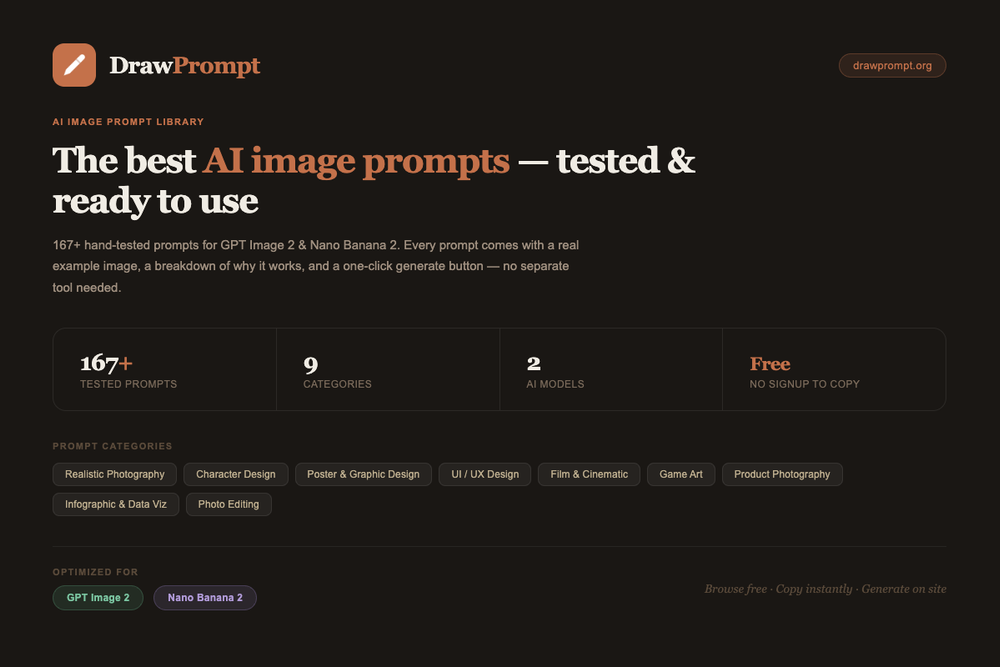
DrawPrompt is a prompt discovery and AI image generation site centered on curated image prompts for GPT Image 2, Nano Banana 2, and related AI image workflows. The public site highlights a library of more than 175 copy-ready prompts, with examples across photography, poster design, product visuals, character concepts, UI mockups, infographics, and photo editing.
The product is most relevant for users who want a reliable starting point for visual prompts rather than inventing every instruction from scratch. It can help creators explore styles and prompt structure, but professional users should still verify output rights, plan limits, and model-specific behavior before using generated images in client or commercial work.
Key Features
- A curated AI image prompt library with 175+ prompts listed in the public metadata.
- Prompt coverage for GPT Image 2 and Nano Banana 2, with visible compatibility references to ChatGPT, Midjourney, and DALL-E on some prompt cards.
- Example-driven prompt cards that include copy, generate, details, model labels, category tags, and difficulty signals.
- Visual categories such as realistic photography, character design, UI/UX design, poster and graphic design, film and cinematic, game art, product and commercial, infographic, and photo editing.
- On-site AI image generation powered by GPT Image 2, with 1 free credit mentioned for new sign-ups.
- Educational resources, including model-specific guides and curated prompt libraries for improving AI image generation.
Use Cases
DrawPrompt is useful for creators who want prompt inspiration with enough structure to produce more specific images. Instead of starting with a vague phrase, users can browse the DrawPrompt library and adapt prompts that already include subject, style, composition, and technical direction.
Designers and marketers may use it for product posters, commercial mockups, event-style graphics, typography-heavy visuals, or campaign concepts. The product and commercial category appears especially relevant for users who need product photography directions or ad-like visual concepts.
Artists and educators may find value in the prompt examples and explanations. The site includes use cases such as vocabulary-card visuals, cinematic scenes, character design, game art, and photo transformations, which makes the library useful for experimentation as well as practical content creation.
Pricing
DrawPrompt's prompt browsing is presented as free, and the public FAQ says users can browse AI prompts, use the drawing generator, and create without a paywall. For image generation, the DrawPrompt pricing page lists 1 free credit on sign-up and paid monthly plans: Starter at $5.9/month, Pro at $14.9/month, and Premium at $29.9/month. The site says subscriptions auto-renew monthly, credits refresh at the start of each billing cycle, and users can cancel anytime, with benefits remaining available until the current billing period ends.
User Experience and Support
The visible interface appears built for scanning examples quickly. Prompt cards show names, model labels, categories, skill levels, sample prompt fragments, and actions such as copy, generate, and details. That structure should help users compare prompt types before spending generation credits.
Support and learning material appear more content-led than service-heavy in the fetched pages. The site shows frequently asked questions and prompt resources, including model-specific guides and curated libraries. Users who need account support, refund information, licensing clarity, or business usage terms should check the current policy and contact information because the fetched evidence does not show a detailed support center.
Technical Details
The public site identifies GPT Image 2 as the model powering image generation and states that the prompt library is built for GPT Image 2 and Nano Banana 2. It also notes that many prompts can work across major AI image generators, though users may need to adjust model-specific syntax such as Midjourney parameters.
The fetched material does not clearly document an API, external integrations, private workspaces, enterprise controls, storage behavior, or automated bulk generation workflows. Users planning production usage should verify daily limits, quality tiers, credit consumption, supported output settings, and commercial usage rights before relying on the platform.
Pros and Cons
Pros
- Offers a structured starting point for AI image prompts across many visual categories.
- Includes prompt examples, details, and copy or generate actions rather than only static inspiration.
- Free prompt browsing makes it easy to evaluate the library before choosing a paid generation plan.
- Visible pricing tiers help users compare monthly credit and quality needs.
- Prompt resources may help users learn how better image prompts are assembled.
Cons
- Technical documentation and integration details are limited in the fetched public pages.
- AI image results can vary by model, settings, and prompt edits, so example outcomes should not be assumed to repeat exactly.
- Commercial users need to verify rights, licensing, and policy terms before using generated images publicly.
- Paid usage depends on credits, daily limits, and quality tiers that may matter for frequent creators.
- Support signals are present through FAQ and resources, but a detailed help center is not clearly visible in the evidence.
FAQ
What is DrawPrompt used for?
DrawPrompt is used to browse, copy, adapt, and generate AI image prompts. It is designed for users who want tested prompt ideas for visual styles such as photography, product imagery, posters, characters, UI concepts, and infographics.
Who is DrawPrompt best for?
It appears best for creators, designers, marketers, AI art users, and prompt learners who need structured image-generation ideas. It may be less suitable for teams that require formal collaboration tools, API access, or enterprise controls unless those are documented elsewhere.
What AI models does DrawPrompt mention?
The site highlights GPT Image 2 and Nano Banana 2, and some prompt cards reference compatibility with tools such as ChatGPT, Midjourney, and DALL-E. Users should expect to adjust prompts when moving between models because each generator handles syntax and parameters differently.
Can users generate images directly on DrawPrompt?
Yes. The public pricing copy says users can sign up and receive 1 free credit to try GPT Image 2 image generation. Paid plans are available for more credits, higher quality tiers, and higher daily limits.
Is the prompt library free to browse?
The site says browsing prompts is free and that users can browse all AI prompts, use the drawing generator, and create. Paid plans are positioned around image generation credits and higher usage needs.
What kinds of visual categories are included?
Visible categories include realistic photography, character design, UI/UX, poster and graphic design, film and cinematic visuals, game art, product and commercial imagery, infographics, and photo editing.
What should commercial users verify before using DrawPrompt outputs?
Commercial users should verify image rights, license terms, refund rules, credit usage, quality tiers, output restrictions, and whether generated visuals can be used in client or brand campaigns. The public prompt examples are useful starting points, but they do not replace legal or usage review.
Does DrawPrompt offer integrations or an API?
The fetched public evidence does not clearly show integrations or API documentation. Users who need programmatic generation, team workflows, or pipeline automation should confirm those requirements directly on the current site.
Conclusion
DrawPrompt gives AI image users a practical library of tested prompts and a built-in path to generate images with GPT Image 2. Its strongest public value is prompt discovery and adaptation, while technical integrations, commercial policy details, and production limits are areas that careful users should verify before making it a core creative workflow tool.