Introduction
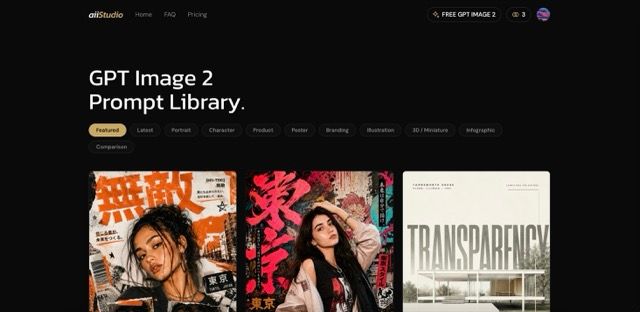
aiiStudio is an AI image and video creation platform centered on GPT Image 2 prompts, examples, and a browser-based generator. The public site presents it as a practical workspace for designers, marketers, indie founders, and creators who want to explore prompt ideas, copy reusable prompt structures, and generate or edit images without starting from a blank page. Its clearest value is the combination of a visible prompt library, free starting credits, and paid credit plans, while careful users should still verify model access, content limits, and plan details before relying on it for regular production work.
Key Features
- Curated GPT Image 2 prompt library with real render examples and categories such as portrait, character, product, poster, branding, illustration, 3D, miniature, infographic, and comparison.
- One-click prompt copying so users can open an image idea, copy the prompt, and adapt the subject, location, product, lighting, mood, or style cues.
- Browser-based generation, with the homepage describing a free generator that runs in the browser and lets new users begin with free credits.
- Image editing support through uploaded references, where the site says users can describe edits in plain English while preserving identity and composition.
- Access to third-party AI image and video generation models through a custom interface, including GPT Image 2, Nano Banana, Veo 3, Seedance, and Kling as listed on the public page.
- Paid credit plans that work across generation and editor tools, with different monthly credit amounts for lighter, regular, and high-volume usage.
Use Cases
aiiStudio appears most useful for creators who already know they want AI-generated visuals but need better starting points for prompts. A designer working on product imagery, poster concepts, branding explorations, or UI mockups can browse examples first, then reuse the prompt structure rather than inventing the whole instruction from scratch. That makes the prompt library especially relevant for visual ideation, where composition and style language often matter as much as the subject.
Marketers and indie founders may also find the product useful for quick campaign visuals, e-commerce experiments, comparison graphics, or concept images. The site highlights categories and examples from real creators, which suggests a discovery-first workflow: find a prompt that resembles the desired output, adjust the subject or product details, and then generate a new version through aiiStudio or a separate ChatGPT session.
For photo-editing scenarios, the public copy says users can upload an existing image as a reference and describe the change in plain English. That makes aiiStudio relevant for people who want to test image-to-image edits, virtual try-on concepts, or creative variations. Readers should confirm acceptable usage rules, output rights, and content policy boundaries before using generated images commercially.
Pricing
aiiStudio has a dedicated pricing page and states that new users can start free with 15 credits and no credit card required. The visible paid options include Hobby with 120 credits per month at a listed cost per credit of $0.06, Pro with 1,000 credits per month at $0.03 per credit, and Max with 2,500 credits per month at $0.02 per credit. The pricing copy says plans can be monthly, yearly, or pay as you go, and that subscription credits reset monthly and do not carry over, so users with variable workloads should check the current plan terms before subscribing.
User Experience and Support
The user experience described on the public site is built around browsing examples, opening a prompt, copying it, and adapting it for a new subject or product. That is a relatively approachable workflow for people who understand the kind of image they want but do not yet have the right prompt language. The presence of categories such as product, poster, branding, and infographic also helps users navigate by visual goal rather than by model terminology.
Support signals are visible but plan-dependent. The Pro plan mentions email support, while the Max plan mentions priority support, and the site includes a public FAQ page covering questions such as free access, prompt quality, image editing, and content policy. The available evidence does not show a full help center or developer documentation, so teams that need formal onboarding, service-level expectations, or detailed usage policies should verify those details directly.
Technical Details
aiiStudio is presented as a browser-based custom interface for accessing third-party AI image and video generation models. The public page names GPT Image 2, Nano Banana, Veo 3, Seedance, and Kling, and it states that aiiStudio is independent and not affiliated with, endorsed by, or sponsored by OpenAI, Google, or other AI model providers. The site also describes GPT Image 2 as an image generation model with prompt adherence, text rendering, and uploaded-image editing capabilities.
The fetched pages do not expose deeper implementation details such as API access, export formats, deployment options, team administration, or data-handling controls. For individual creative use, that may not matter much. For agencies, product teams, or commercial workflows, those technical and operational questions are worth checking before making aiiStudio part of a repeatable production process.
Pros and Cons
Pros
- The prompt library gives users concrete visual examples instead of only abstract prompt advice.
- Free starting credits and a browsable library reduce the friction for first-time exploration.
- The product page clearly identifies several creative categories, including product, poster, branding, illustration, and infographic work.
- Pricing signals are more visible than on many small AI tools, including credit amounts and cost-per-credit examples.
- The site is transparent that aiiStudio is an independent interface for third-party models rather than an official model provider.
Cons
- Subscription credits reset monthly and do not carry over, which may be a drawback for users with irregular generation needs.
- Technical information is limited on the public pages, especially around API access, exports, team controls, and operational policies.
- Support appears to vary by plan, so users on lower tiers should confirm what help is available before depending on the tool.
- The site references third-party models, which means availability, behavior, and policies may depend on providers outside aiiStudio.
- Commercial users should verify content policy, licensing, and rights for generated or edited assets before using outputs in client or brand work.
FAQ
What is aiiStudio used for?
aiiStudio is used for browsing GPT Image 2 prompt examples, copying prompt structures, and generating or editing AI images through a browser-based interface. The public site also says it provides access to third-party image and video generation models such as GPT Image 2, Nano Banana, Veo 3, Seedance, and Kling.
Who is aiiStudio best suited for?
The site explicitly mentions designers, marketers, indie founders, and anyone who wants to avoid the trial-and-error of writing prompts from scratch. It appears especially relevant for creators who need visual ideas for product images, posters, branding concepts, portraits, illustrations, UI mockups, or comparison graphics.
Can users try aiiStudio for free?
Yes. The public pricing and homepage copy state that new accounts receive free credits on signup, with no credit card required, and the pricing page says users can start free with 15 credits. Anyone evaluating the tool should still check the current credit rules because pricing and access terms can change.
What pricing plans does aiiStudio show publicly?
The visible pricing page lists Hobby, Pro, and Max plans. The fetched pricing copy shows 120 credits per month for Hobby, 1,000 credits per month for Pro, and 2,500 credits per month for Max, with subscription credits resetting monthly and not carrying over.
Does aiiStudio support image editing as well as text-to-image generation?
The public site says users can upload an existing photo as a reference and describe changes in plain English, and the pricing page mentions GPT Image 2 text-to-image and image-to-image. Users who need precise editing behavior should test the workflow with their own images and confirm any usage limits.
What should commercial users verify before relying on aiiStudio?
Commercial users should verify output rights, content policy restrictions, model availability, plan limits, support expectations, and whether the workflow fits their quality standards. The public pages give useful product and pricing signals, but they do not show every operational detail a team may need for client or brand work.
Is aiiStudio officially affiliated with OpenAI or other model providers?
No. The public page states that aiiStudio is an independent product and is not affiliated with, endorsed by, or sponsored by OpenAI, Google, or any other AI model provider. It describes itself as a custom interface for accessing third-party AI image and video generation models.
Conclusion
aiiStudio is a focused option for creators who want a faster route from image idea to usable AI prompt, with public examples, free starting credits, and visible paid credit plans. Its strongest fit appears to be prompt-led visual exploration and lightweight generation or editing workflows. Before using it at scale, readers should review the latest pricing, support, usage rights, and model limitations so the tool matches their creative and commercial requirements.