Introduction
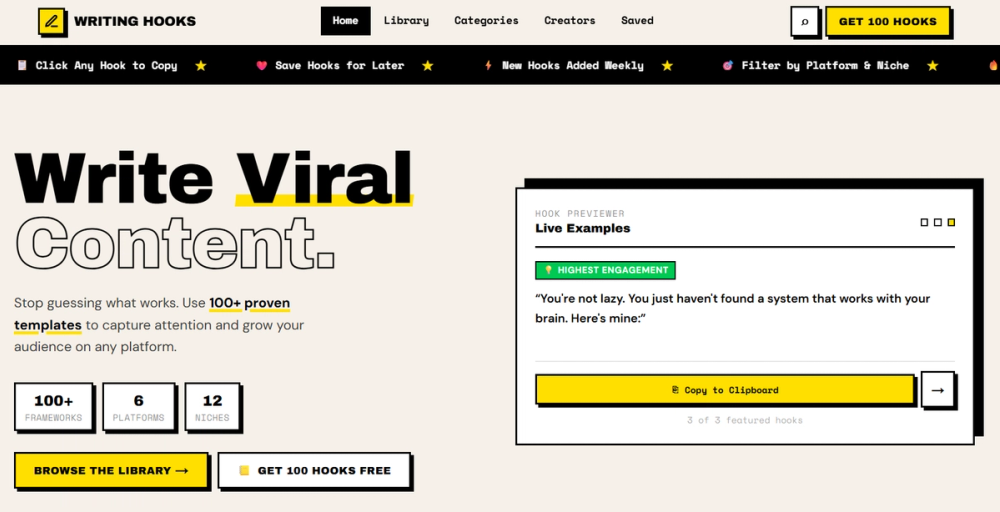
Writing Hooks is a free toolkit for creators who want to write sharper opening lines for social posts, newsletters, videos, and other content formats. The public page presents it as a practice-focused resource with a hook library, writing studio, challenges, saved hooks, search, and AI feedback prompts, all available without signup.
The clearest fit is for creators, marketers, founders, and newsletter writers who already know their topic but struggle to frame the first sentence in a way that earns attention. Readers should still treat the examples as writing aids rather than formulas for reach, because the site shows frameworks and practice tools, not performance results.
Key Features
- The site highlights a hook library with more than 100 hook frameworks for improving opening lines.
- A writing studio appears to let users practice one hook at a time, with progress saved automatically.
- Writing challenges are visible, including a 30 email subject line challenge built around different psychological triggers.
- AI prompts are listed as part of the toolkit, suggesting users can use prompt-based feedback while refining hooks.
- Search and saved hooks are visible navigation items, which should help users revisit useful frameworks rather than browsing manually each time.
- The page shows category and channel cues such as Twitter hooks, LinkedIn hooks, YouTube hooks, Reels hooks, newsletter hooks, productivity, creator economy, and entrepreneurship.
Use Cases
Writing Hooks is likely useful for creators who need a repeatable way to practice the first line of a post before publishing. The examples shown on the page focus on curiosity gaps, contrarian angles, before-and-after framing, truth-bomb statements, hot takes, and insider knowledge, which are common patterns in social and newsletter writing.
The tool also fits marketers and founders who write across several channels. Someone preparing a LinkedIn post, a YouTube intro, an email subject line, or a short-form social caption could use the library to compare different opening structures before choosing the version that matches the message.
A careful user should avoid treating any template as a shortcut to viral results. The public page provides frameworks and examples, but actual content performance will still depend on topic quality, audience fit, timing, distribution, and whether the promise in the hook is supported by the rest of the content.
Pricing
The public page describes Writing Hooks as a free toolkit and includes the phrase "Free Always." It also says users can practice, take challenges, and use AI prompts without signing up. The page does not show paid subscription tiers for the writing toolkit itself, although it does include a separate note that the WritingHooks.com site is for sale for $350, which is a domain/site ownership notice rather than user pricing for the tool.
User Experience and Support
Writing Hooks appears designed around quick, self-directed practice. The visible navigation includes Library, Studio, Challenges, AI Prompts, Saved, and Search, which suggests the experience is organized around finding a framework, trying it, and returning to saved ideas later.
Support information is limited in the captured public evidence. The site shows practice instructions and challenge content, but it does not clearly expose a help center, contact route, documentation page, or community support option. Users who need formal support, account recovery, or detailed usage terms should verify those details directly on the site before depending on it for recurring writing work.
Technical Details
The available page evidence does not identify the underlying technical stack, API access, export formats, browser extension support, or integrations with social platforms. It does show that progress saves automatically and that the toolkit can be used without signup, but the exact storage behavior, privacy handling, and data retention approach are not visible from the captured page text.
Because the product is centered on writing practice rather than publishing automation, users should assume it helps with drafting and ideation unless the live site shows direct posting, team collaboration, or third-party workflow integrations.
Pros and Cons
Pros
- Free access is clearly emphasized on the public page.
- The tool is focused on a specific writing problem: improving hooks and opening lines.
- The library covers multiple content channels, including Twitter, LinkedIn, YouTube, Reels, and newsletters.
- Built-in challenges give users a practical way to practice instead of only reading templates.
- No-signup access lowers friction for a quick trial.
Cons
- Public support and documentation details are not clearly visible.
- The page does not show integrations, export options, or team workflow features.
- Hook templates can help with framing, but they cannot guarantee engagement or content quality.
- Technical details such as data storage and saved-progress behavior are not explained in depth.
- Some examples use strong performance-style framing, so users should adapt them carefully to avoid exaggerated claims.
FAQ
What is Writing Hooks used for?
Writing Hooks is used to practice and improve opening lines for content. The public page presents a hook library, writing studio, challenges, AI prompts, saved hooks, and search features for creators who want stronger first lines.
Who is Writing Hooks suited for?
It appears suited for creators, founders, marketers, newsletter writers, and social media writers who regularly need hooks for posts, videos, emails, or short-form content. The visible categories include creator economy, entrepreneurship, productivity, Twitter hooks, LinkedIn hooks, YouTube hooks, Reels hooks, and newsletter hooks.
Does Writing Hooks offer AI feedback?
AI prompts are listed as part of the toolkit, and the page says users can use AI prompts to get feedback. The exact feedback workflow, model provider, and whether feedback happens inside the site or through prompts copied into another AI tool are not clear from the visible evidence.
Is Writing Hooks free to use?
The site describes itself as a free toolkit and includes "Free Always" in the visible page text. It also says users can practice, take challenges, and use AI prompts without signing up. Users should still check the live site for any future pricing changes.
Can Writing Hooks help with email subject lines?
Yes, the page shows a 30 Email Subject Line Challenge. It says the challenge uses proven hook frameworks and different psychological triggers, which makes it relevant for writers testing subject-line angles before sending campaigns or newsletters.
Does Writing Hooks publish content to social platforms?
The captured evidence does not show direct publishing to social platforms. It presents writing frameworks, practice tools, saved hooks, and channel-specific hook categories, so users should treat it as a writing and ideation aid unless the live site shows publishing integrations.
What should users verify before relying on Writing Hooks regularly?
Users should verify how saved progress works, whether any account features are required, what support options exist, and whether the AI prompt workflow fits their writing process. They should also adapt hooks to their audience rather than copying dramatic examples without context.
Conclusion
Writing Hooks is a focused, low-friction resource for creators who want more structure when writing opening lines. Its strongest visible value is the combination of hook frameworks, practice challenges, and channel-specific inspiration in a free no-signup toolkit.
It works more clearly as a practice environment and idea library than as a promise of viral growth. For users who write often and want to sharpen the first sentence, it offers a practical starting point with clear limits to verify before making it part of a larger content workflow.