Introduction
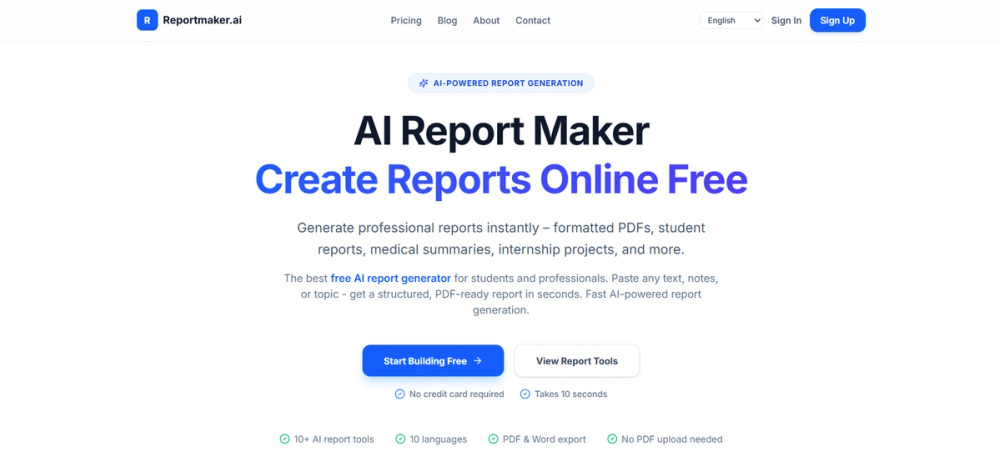
ReportMaker.ai is an AI-powered online platform aimed at students, interns, teachers, and professionals who need structured reports from rough notes or topics. The public site promotes fast generation, PDF- and Word-ready output, and a set of specialized report tools rather than a single generic template. Readers should treat medical-style outputs as documentation aids only and confirm accuracy, institutional rules, and billing details on the official pages before submitting generated documents anywhere.
Key Features
- General and specialized report tools - Nine purpose-built flows cover internship, medical-style, project, case study, college project, business, seminar, technical, and general report generation.
- Paste-to-structure workflow - Users paste text, notes, or a topic; the site describes AI-inferred sections, headings, and prose rather than simple bullet reformatting.
- PDF and Word export - Finished documents can be downloaded as PDF or DOCX depending on plan and tool, with export called out on the homepage and pricing pages.
- Multilingual generation - The UI lists ten languages (including English, French, Spanish, German, and others) for report output.
- Credit-based usage - Free start with credits is advertised alongside one-time credit packs (Starter, Standard, Volume) on the pricing page.
- Privacy messaging - The site states in-memory processing, no server storage of files for training, and GDPR compliance language on public copy-verify current policy text before relying on it for regulated work.
Use Cases
Students and interns can turn seminar notes, placement summaries, or project topics into formatted academic-style reports when deadlines leave little time for manual structure. The site explicitly targets internship final reports, college projects, and lab or seminar formats.
Working professionals may use the business and project report paths for executive summaries, client-facing summaries, or recurring update documents from raw bullet inputs. Researchers can draft literature-style or findings summaries from unstructured notes, then edit before sharing.
Educators and trainees evaluating AI writing aids should still review outputs for factual accuracy, citation requirements, and school or employer policies on AI-assisted work-the product speeds formatting, not verification of claims.
Pricing
The homepage emphasizes free core generation without a credit card to get started, while the pricing page compares subscriptions and credit packs. Visible one-time packs include Starter at $1.99 for 20 credits (standard PDF export, non-expiring credits), Standard for 50 credits with PDF and DOCX export, and Volume for 120 credits with bonus credits and priority support listed. Exact Pro or Business subscription tiers referenced in meta copy should be confirmed live on pricing, since plan names and limits can change.
User Experience and Support
Navigation offers Pricing, Blog, About, and Contact, plus Sign In and Sign Up though some tools advertise no sign-up required for basic use. The about page restates the mission to make report creation fast and accessible. Contact routes general queries, feedback, issue reports (with reproduction details requested), business or API inquiries, and a grievance officer for privacy concerns; email support cites a typical 48-hour response SLA.
Technical Details
Report generation appears fully web-based with no public SDK or integration catalog in the fetched pages. Business inquiries mention API usage on the contact page without publishing API docs in the crawl. Export formats are PDF and DOCX; languages and credit consumption per report type should be verified in-app. Medical tooling is described for structured documentation, not clinical diagnosis-appropriate only where non-diagnostic summaries are acceptable.
Pros and Cons
Pros
- Broad catalog of report types in one domain-focused product.
- Clear pitch for unstructured input and AI-chosen section structure.
- Transparent credit-pack pricing with one-time payment options visible.
- Multiple languages and dual export formats support varied audiences.
Cons
- Credit limits and export formats differ by tier; heavy users need to map usage to packs.
- Medical and academic outputs require human review and may not meet every institution's standards.
- API details are inquiry-only, not self-serve from public pages.
- Privacy and GDPR claims should be cross-checked against the current privacy policy for your jurisdiction.
FAQ
What is ReportMaker.ai and what problem does it appear to solve?
ReportMaker.ai presents itself as an AI report generator that converts pasted notes or topics into structured, downloadable documents. It appears aimed at reducing manual formatting time for students, interns, and professionals facing recurring report deadlines.
Who is ReportMaker.ai best suited for?
The site names students, teachers, interns, researchers, and professionals. Specialized tools suggest the best fit is anyone who needs a formatted PDF or Word report quickly from messy input-not teams needing deep collaborative authoring or regulated clinical records.
How does the generation workflow work on the public site?
The described flow is: pick a report type, paste text or a topic, let AI produce sections and paragraphs, then download PDF or DOCX. Homepage copy claims results in seconds and lists nine specialized tools plus a general generator.
What should users verify about pricing and credits?
Confirm current credit costs per report, whether DOCX requires a paid pack, and if subscriptions differ from one-time packs on the live pricing page. Starter, Standard, and Volume pack sizes and prices were visible at crawl time but can change.
Does ReportMaker.ai require an account?
Marketing on the homepage states no sign-up needed for some flows and optional registration elsewhere. Users with compliance needs should test the exact tool they plan to use and see whether Sign In is enforced for export or history.
Can ReportMaker.ai replace expert review for medical or academic submissions?
No. Public copy positions medical tooling as structured documentation for students and clinics, with non-medical advice disclaimers implied by "medical-style" wording. Academic and business reports still need fact-checking, sourcing, and policy review before official submission.
What support channels are available?
Email support, feedback, issue reporting, partnership or API inquiries, and a grievance officer contact are listed on the contact page with an stated 48-hour response target for general email.
Conclusion
ReportMaker.ai bundles many report templates behind a paste-and-export AI workflow with free-to-start credits and paid packs for heavier use. Evaluators should read pricing and contact pages for up-to-date limits, then pilot one report type that matches their real deliverable before depending on it for graded or client-facing work.