Introduction
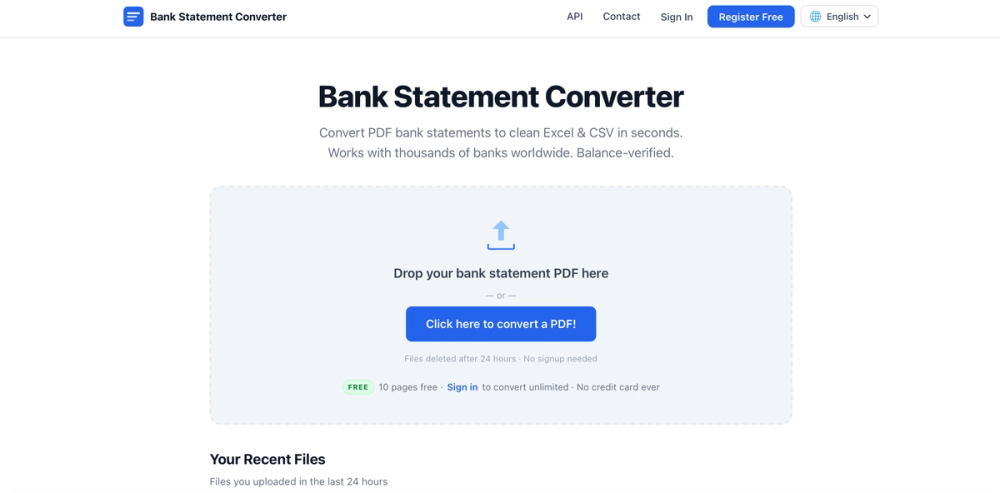
Bank Statement Engine presents itself on its public site as Bank Statement Converter-a free tool for turning PDF bank statements into Excel, CSV, JSON, and accounting-friendly formats. The homepage emphasizes instant conversion, balance-verified output, and support for thousands of banks worldwide without requiring signup for short files. Anyone evaluating the service should review the homepage and confirm page limits, data retention, and API terms before uploading sensitive financial documents.
Key Features
- Drag-and-drop PDF conversion to Excel (XLSX), CSV, JSON, Tally CSV/XML, and QuickBooks QBO from a browser-based workspace.
- Balance-verified parsing with inline cell editing before download, so users can correct rows before exporting.
- OCR handling for scanned PDFs, plus unlock flows for password-protected statements.
- Multi-bank coverage across USA, India, UK, Europe, Australia, Middle East, Africa, and other regions.
- 24-hour file history, bulk merge of selected statements into one CSV, and a report-problem flow for failed conversions.
- REST API for programmatic PDF uploads with JSON transaction output, documented on the API page.
Use Cases
Bookkeepers and small-business owners can convert monthly PDF statements into Excel or CSV for import into Xero, Zoho Books, Sage, or spreadsheet workflows. The public copy suggests the tool is aimed at readers who need clean tabular data rather than manual copy-paste from PDF viewers.
Developers building fintech or accounting products can integrate bank-statement parsing through the REST API, using authenticated endpoints and JSON responses. Official SDKs for Python, Node.js, and PHP are listed as planned; until then, any HTTP client can call the documented endpoints.
Accountants handling mixed statement formats-including scanned or password-protected PDFs-can use OCR and unlock options, then report conversion issues through the built-in problem form or contact page when output does not match expectations.
Pricing
The site advertises simple, free pricing with no subscriptions and no credit card required. Anonymous users get 10 pages per day with CSV and Excel download, password-protected PDF support, and 24-hour file history. Registered users can convert unlimited pages, bulk-convert multiple files, and generate API keys from the dashboard. PDFs longer than 10 pages require a free account to download results. Higher API rate limits and custom volume plans are available by contacting the team. Readers should verify current limits on the live site because marketing copy may not list every enforcement rule.
User Experience and Support
The interface centers on a single upload zone with clear status messaging for conversion, OCR progress, and password prompts. Recent files remain accessible for 24 hours, and users can edit cells before downloading in multiple accounting formats.
Support routes include in-app problem reporting with optional PDF access for review, plus a dedicated contact form for questions, failed conversions, feature requests, and API access. The contact page states responses typically arrive within 1-2 business days and recommends including a run ID for urgent issues. The site also publishes a privacy stance: files are processed on servers, transmitted over HTTPS, and permanently deleted after 24 hours.
Technical Details
The web product accepts PDF uploads and returns structured transaction data. Export formats include XLSX, CSV, JSON, Tally variants, and QuickBooks QBO. The REST API accepts PDF uploads via HTTP, returns JSON transaction data, and uses an API key in the Authorization header. Endpoints cover convert, retrieve previous results by run_id (available 24 hours), and direct download of output files. Rate limits apply to API usage; custom plans require contacting the team. No special client libraries are required today, though SDKs are noted as planned for Python, Node.js, and PHP.
Pros and Cons
Pros
- Free entry for anonymous users with 10 pages per day and no credit card.
- Broad output format support for spreadsheets and accounting software.
- OCR and password-protected PDF handling cover common real-world statement types.
- Published API documentation for developer integrations.
- Clear 24-hour data deletion policy and HTTPS processing.
Cons
- Longer PDFs require free registration before download.
- API rate limits and custom volume pricing are not fully detailed publicly.
- Official SDKs are not yet available; integrations rely on raw HTTP clients.
- Conversion accuracy for unusual bank layouts may still need manual review or support contact.
- Sensitive financial data is processed on vendor servers-readers should confirm compliance needs for their jurisdiction.
FAQ
What is Bank Statement Engine on the public website?
The site brands the product as Bank Statement Converter. It converts PDF bank statements into Excel, CSV, JSON, and several accounting-specific formats, with support for thousands of banks and balance-verified output.
Who is this tool most relevant for?
It appears most useful for bookkeepers, small businesses, accountants, and developers who need structured transaction data from PDF statements. Teams with strict on-premise-only data policies should review the cloud processing model before use.
What output formats can users download?
The homepage lists Excel (XLSX), CSV, JSON, Tally CSV, Tally XML, and QuickBooks QBO. Users can edit cells in the browser before downloading, and bulk-merge multiple recent files into one CSV.
How does free usage differ from a registered account?
Anonymous users get 10 pages per day without signup. PDFs over 10 pages require a free account to download. Registered users gain unlimited pages, bulk conversion, and API key generation according to the public pricing section.
Does Bank Statement Engine offer an API?
Yes. The API documentation describes REST endpoints for uploading PDFs, retrieving results by run_id, and downloading converted files. Authentication uses an API key in the Authorization header; contact the team for higher rate limits or custom plans.
How does the site handle privacy and file retention?
The public copy states files are processed on servers over HTTPS and permanently deleted after 24 hours. Recent uploads appear in a 24-hour history list inside the product.
What should users do if a statement does not convert correctly?
The UI includes a report-problem flow and optional PDF access for review. Users can also reach the team through the contact page and include a run ID for faster troubleshooting; responses are typically within 1-2 business days.
Conclusion
Bank Statement Engine is worth considering when you need fast PDF-to-spreadsheet or API-driven bank statement parsing without upfront payment. Use the official site to test a short statement, confirm registration limits for longer files, and review API docs if you plan to integrate parsing into your own product.