Introduction
CostLoop is a subscription management app for small businesses, freelancers, startups, remote teams, and individuals who need to understand what they are paying for every month. The public site presents it as a manual tracker for software subscriptions, licenses, renewal dates, owners, invoices, contracts, cancellation links, and recurring costs. The product is most relevant for teams that want better SaaS visibility without connecting bank accounts or adopting a full procurement system.
Key Features
- Subscription records for recurring tools, including price, billing cycle, category, status, owner, and renewal date.
- License tracking for seat counts, assigned users, expiry dates, and related subscription details.
- Renewal reminders through email alerts, with visible lead-time options for 7, 14, or 30 days.
- Cost overview with monthly spend, annual forecast, budget comparison, category views, and dashboard analytics.
- Document storage for invoice links, PDFs, contract URLs, vendor agreements, cancellation links, and notes.
- Health score, action center, unused seat detection, duplicate tool detection, savings opportunities, CSV import, CSV export, and team workspace features on supported plans.
Use Cases
CostLoop addresses a common small-business problem: subscriptions are easy to buy and hard to govern once several people are adding tools. The CostLoop site highlights forgotten renewals, unused seats, scattered invoices, lost cancellation links, unclear ownership, and poor visibility into total software spend.
For freelancers and solo consultants, CostLoop can act as a recurring-cost command center. It appears useful for tracking domains, design tools, developer services, accounting software, memberships, and other regular expenses so the user can review renewals before payment dates arrive.
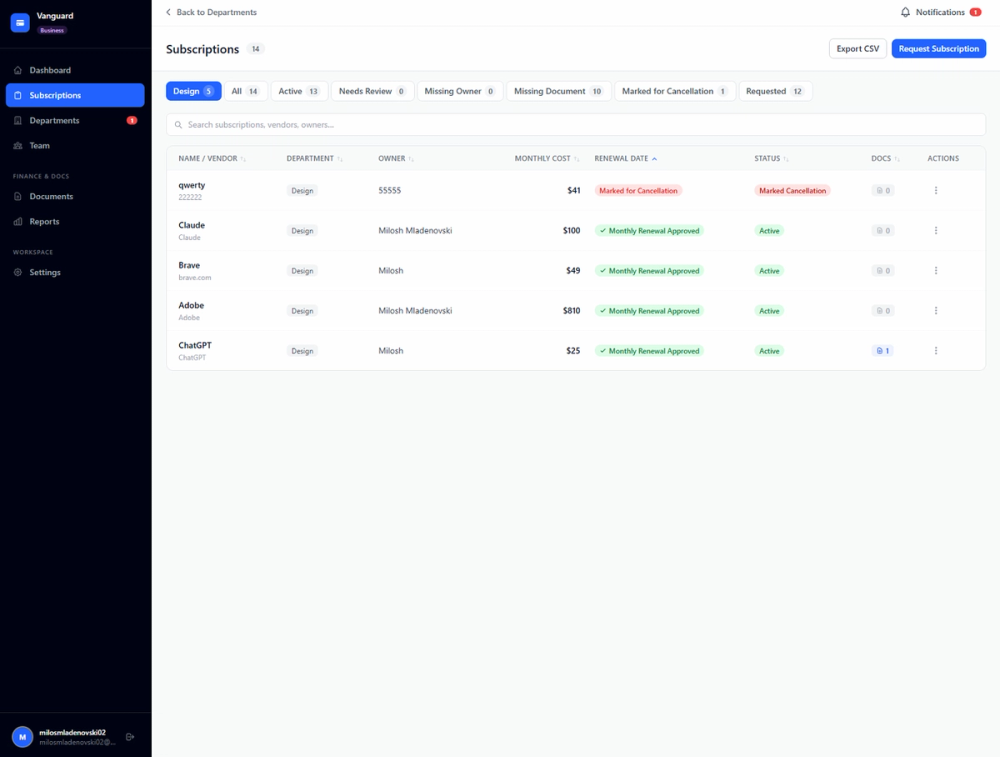
For small teams, the more valuable use case is accountability. Owner records, departments, renewal calendars, subscription requests, approval workflows, admin notifications, and workspaces help teams move from "someone probably owns this" to a clearer operating process. A careful buyer should still confirm whether the current plan includes the specific team features they expect.
Pricing
CostLoop's pricing page lists three plans. Free is $0 per month and lets users test with 1 subscription without a credit card. Pro is $9 per month for 1 user and includes unlimited subscriptions, health score and breakdown, savings opportunities, renewal calendar, CSV import and export, advanced reminders, bulk actions, and priority support. Business is $39 per month and adds workspaces, team members, a real-time subscription request system, approvals, instant email notifications to admins, a business panel view, and an admin-level dashboard. The page also mentions yearly billing with 2 months free, no annual lock-in, and the ability to cancel Pro from account settings.
User Experience and Support
The product experience is built around manual entry rather than financial automation. CostLoop says users add recurring tools themselves and do not need to connect a bank account, card, or financial data source. That keeps the setup simple and controlled, but it also places responsibility on the user or team to keep subscription records accurate.
Support is visible through the contact page, which says the small team reads every message and replies within 1 business day. The public pages also mention email support, priority support, billing support, plan changes, refund requests, privacy requests, data export, account deletion, blog guides, and account settings for managing plans.
Technical Details
CostLoop is a web-based SaaS product with a no-integration-required model. The site states that users do not connect bank accounts or grant financial-account access, and that no IT ticket is needed to begin. Data can be moved through CSV import and CSV export where plan support allows it.
The site also provides several implementation signals: payments are handled through Stripe, authentication and data storage through Supabase, and email through Resend. CostLoop says it supports 10 currencies and multiple languages, and its public privacy notes mention data export, account deletion, privacy settings, and GDPR-related controls.
Pros and Cons
Pros
- CostLoop is focused on a real operational problem: tracking recurring software costs before renewals, unused seats, and scattered documents become expensive.
- The manual approach avoids bank integrations and financial-account access, which may suit privacy-conscious small teams.
- Pricing and plan differences are publicly visible, including Free, Pro, and Business tiers.
- The feature set goes beyond a basic list by including renewal reminders, ownership fields, health score signals, cancellation links, invoice links, and CSV portability.
- Business features such as workspaces, approvals, and admin dashboards make the product more useful for shared team processes.
Cons
- Manual tracking means CostLoop will not automatically discover missed subscriptions from transactions or card statements.
- Advanced features such as health score, savings opportunities, CSV import/export, and team workflows are not all available in the free tier.
- The product is intentionally narrower than accounting, ERP, procurement, or expense platforms.
- Buyers who need deep integrations with finance, HR, identity, or vendor-management systems should verify current integration coverage before relying on it.
FAQ
What problem does CostLoop solve?
CostLoop helps users keep track of recurring software subscriptions, licenses, renewal dates, invoices, contracts, cancellation links, and ownership details. It is designed for situations where subscription information is spread across spreadsheets, inboxes, card statements, and different team members.
Is CostLoop for individuals or teams?
The site addresses both. Individuals and freelancers can use it to track personal or business subscriptions, while startup teams, remote teams, and small businesses can use owner records, team workspaces, approval flows, and admin dashboards where the selected plan supports those features.
Does CostLoop require bank integration?
No. CostLoop states that it is fully manual and does not connect to bank accounts or read financial accounts. Users enter subscriptions themselves, which gives them control over the data but requires regular maintenance.
What does the Free plan include?
The Free plan is listed at $0 per month and allows users to test CostLoop with 1 subscription. The pricing page mentions dashboard and basic analytics, renewal reminders, manual tracking, cancellation link storage, document links, and notes for the free entry point.
Which CostLoop features are useful for SaaS renewal management?
The most relevant visible features are renewal reminders, renewal calendar, owner records, action center, cancellation links, invoice and contract storage, health score, unused seat detection, duplicate tool detection, and savings opportunities. These features are aimed at helping users review subscriptions before they renew.
What support options does CostLoop show publicly?
CostLoop shows a contact page with email as the main support route and says replies usually arrive within 1 business day. The pricing page also refers to email support and priority support, depending on the plan.
What should businesses check before choosing CostLoop?
Businesses should verify which plan includes the features they need, whether manual subscription entry fits their process, and whether the product's focused tracking scope is enough. If a team needs automatic transaction scanning or accounting-system integrations, it should confirm those requirements directly before adopting CostLoop.
Conclusion
CostLoop is a focused subscription tracker for users who want recurring software costs in one place without connecting financial accounts. Its public pages make the clearest case for small businesses and freelancers dealing with renewal surprises, unused seats, scattered invoices, and unclear ownership. If those are the problems to solve, CostLoop offers a practical structure with transparent pricing and enough caveats to evaluate fit carefully.