Introduction
Tangy Tools is presented on its public website as Tangy Tools | Free Online Text Tools for Copy & Paste | Instant, free online text tools to convert text to subscript, superscript, and more. No sign-up or installs required. Just type, copy, paste, and go anywhere. | Free Online Text Tools. Instant Results. | Text Tools | Subscript Generator The clearest value for evaluators is seeing how the product describes image, video, or creative workflows in one place. Anyone considering adoption should review Tangy Tools and confirm pricing, output rights, and support before relying on it in production.
Key Features
- Free Online Text Tools. Instant Results.
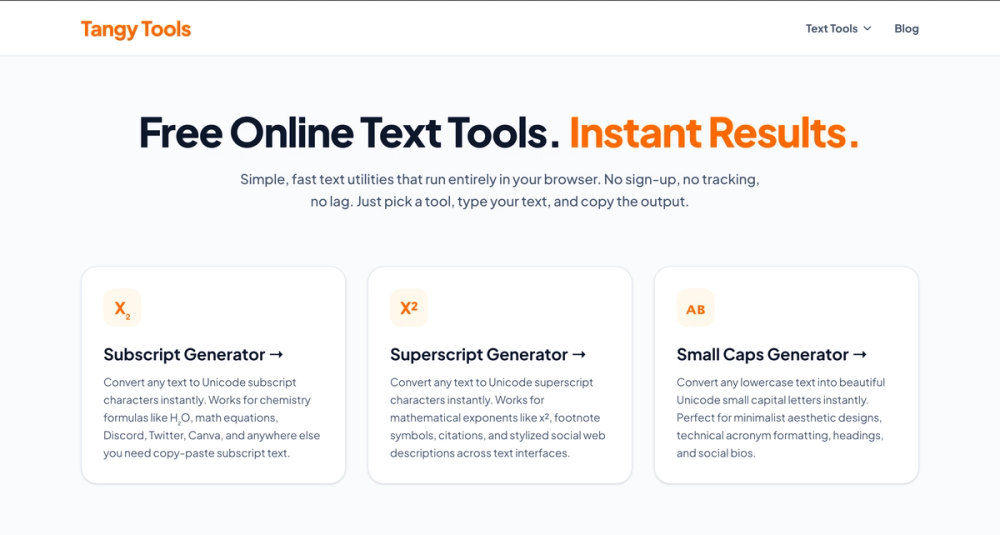
- Convert any text to Unicode subscript characters instantly. Works for chemistry formulas like H₂O, math equations, Discord, Twitter, Canva, and anywhere else you need copy-paste subscript text.
- Convert any text to Unicode superscript characters instantly. Works for mathematical exponents like x², footnote symbols, citations, and stylized social web descriptions across text interfaces.
- Convert any lowercase text into beautiful Unicode small capital letters instantly. Perfect for minimalist aesthetic designs, technical acronym formatting, headings, and social bios.
- Instantly translate modern English sentences into classic, theatrical 16th-century Elizabethan prose. Perfect for historical creative writing, roleplay scripts, or adding a vintage flair to messages.
- Convert standard text into stylishly corrupted, cyberpunk-inspired digital characters. Perfect for crafting unique gaming usernames, eye-catching social media bios, or giving your profile layouts a high-tech vibe.
Use Cases
Subscript Generator Superscript Generator Small Caps Generator Shakespeare Translator Glitch Text Generator Zalgo Text Generator Counters Character Counter Twitter Character Counter Instagram Character Counter Syllable Counter Social Tools Instagram Line Break Generator LinkedIn Text Formatter Time Tools Reading Time Calculator Blog Text Tools Subscript Generator Superscript Generator Small Caps Generator Shakespeare Translator Glitch Text Generator Zalgo Text Generator Counters Character Counter Twitter Character Counter Instagram Character Counter Syllable Counter Social Tools Instagram Line Break Generator LinkedIn Text Formatter Time Tools Reading Time Calculator Free Online Text Tools. Instant Results. Simple, fast text utilities that run entirely in your browser. No sign-up, no tracking, no lag. Just pick a tool, type your text, and copy the output.
Convert any text to Unicode subscript characters instantly. Works for chemistry formulas like H₂O, math equations, Discord, Twitter, Canva, and anywhere else you need copy-paste subscript text.
Because public pages rarely list every constraint, a practical next step is to test the specific workflow you care about and confirm pricing, rights, and support for commercial use.
Pricing
The public pages include pricing-related wording such as Tangy Tools | Free Online Text Tools for Copy & Paste Instant, free online text tools to convert text to subscript, superscript, and more. No sign-up or installs required. Just type, copy, paste, and go anywhere. Subscript Generator Superscript Generator Small Caps Generator Shakespeare Translator Glitch Text Generator Zalgo Text Generator Counters Character Counter Twitter Character Counter Instagram Character Counter Syllable Counter Social Tools Instagram Line Break Generator LinkedIn Text Formatter Time Tools Reading Time Calculator Blog Text Tools Subscript Generator Superscript Generator Small Caps Generator Shakespeare Translator Glitch Text Generator Zalgo Text Generator Counters Character Counter Twitter Character Counter Instagram Character Counter Syllable Counter Social Tools Instagram Line Break Generator LinkedIn Text Formatter Time Tools Reading Time Calculator Free Online Text Tools. Instant Results. Simple, fast text utilities that run entirely in your browser. No sign-up, no tracking, no lag. Just pick a tool, type your text, and copy the output. Tangy Tools is a collection of free online text tools built for one thing: getting a quick result without any friction. Every tool runs client-side in your browser, so there's nothing to install, no account to create, and no data leaving your device. Readers should confirm current tiers, credit or usage limits, billing cycle, and whether free usage differs from paid output on the official site.
User Experience and Support
The public page structure is scan-friendly: headings and short blocks explain what the product offers without requiring an account to read the positioning. That helps first-time visitors decide whether to explore a trial or sign-up flow.
The site surfaces support or help signals including Text Tools Subscript Generator Superscript Generator Small Caps Generator Shakespeare Translator Glitch Text Generator Zalgo Text Generator Counters & Social Character Counter Twitter Character Counter Instagram Character Counter Syllable Counter Instagram Line Break Generator LinkedIn Text Formatter Reading Time Calculator Company About Blog Contact Privacy Policy © 2026 Tangy Tools. Free online text tools for copy and paste. Teams that need reliable help should still confirm response channels and documentation depth for their use case.
Technical Details
Visible technical signals include Subscript Generator Superscript Generator Small Caps Generator Shakespeare Translator Glitch Text Generator Zalgo Text Generator Counters Character Counter Twitter Character Counter Instagram Character Counter Syllable Counter Social Tools Instagram Line Break Generator LinkedIn Text Formatter Time Tools Reading Time Calculator Blog Text Tools Subscript Generator Superscript Generator Small Caps Generator Shakespeare Translator Glitch Text Generator Zalgo Text Generator Counters Character Counter Twitter Character Counter Instagram Character Counter Syllable Counter Social Tools Instagram Line Break Generator LinkedIn Text Formatter Time Tools Reading Time Calculator Free Online Text Tools. Instant Results. Simple, fast text utilities that run entirely in your browser. No sign-up, no tracking, no lag. Just pick a tool, type your text, and copy the output. Convert any lowercase text into beautiful Unicode small capital letters instantly. Perfect for minimalist aesthetic designs, technical acronym formatting, headings, and social bios. Tangy Tools is a collection of free online text tools built for one thing: getting a quick result without any friction. Every tool runs client-side in your browser, so there's nothing to install, no account to create, and no data leaving your device. Free, ad-free, client-side text tools. No sign-up, no backend. Everything runs right in your browser. Tangy Tools | Free Online Text Tools for Copy & Paste Tangy Tools Text Tools Subscript Generator Superscript Generator Small Caps Generator Shakespeare Translator Glitch Text Generator Zalgo Text Generator Counters Character Counter Twitter Character Counter Instagram Character Counter Syllable Counter Social Tools Instagram Line Break Generator LinkedIn Text Formatter Time Tools Reading Time Calculator Blog Text Tools Subscript Generator Superscript Generator Small Caps Generator Shakespeare Translator Glitch Text Generator Zalgo Text Generator Counters Character Counter Twitter Character Counter Instagram Character Counter Syllable Counter Social Tools Instagram Line Break Generator LinkedIn Text Formatter Time Tools Reading Time Calculator Free Online Text Tools. Instant Results. Simple, fast text utilities that run entirely in your browser. No sign-up, no tracking, no lag. Just pick a tool, type your text, and copy the output. Text Tools X₂ Subscript Generator Convert any text to Unicode subscript characters instantly. Works for chemistry formulas like H₂O, math equations, Discord, Twitter, Canva, and anywhere else you need copy-paste subscript text. X² Superscript Generator Convert any text to Unicode superscript characters instantly. Works for mathematical exponents like x², footnote symbols, citations, and stylized social web descriptions across text interfaces. ᴀʙ Small Caps Generator Convert any lowercase text into beautiful Unicode small capital letters instantly. Perfect for minimalist aesthetic designs, technical acronym formatting, headings, and social bios. 📜 Shakespeare Translator Instantly translate modern English sentences into classic, theatrical 16th-century Elizabethan prose. Perfect for historical creative writing, roleplay scripts, or adding a vintage flair to messages. 👾 Glitch Text Generator Convert standard text into stylishly corrupted, cyberpunk-inspired digital characters. Perfect for crafting unique gaming usernames, eye-catching social media bios, or giving your profile layouts a high-tech vibe. 🕯️ Zalgo Text Generator Bury plain text under a demonic, unrestrained stack of Unicode marks for that unmistakable void look. Perfect for creepypasta, Discord and Roblox chaos, or Halloween posts that need to feel genuinely cursed. Counters 🔢 Character Counter Get live counts for characters, words, sentences, paragraphs, and lines as you type. Includes a spaces toggle and a look at your five most repeated words, handy for tweets, bios, and SEO tags. 🐦 Twitter Character Counter Track active character weights for standard or Premium layouts with official rules. Includes dynamic link-flattening, emoji parsing, and instant metric cards for your DM, bio, username, and profile name limits. 📸 IG Character Counter Track real-time character limits for Instagram captions, bios, and threads. Includes an instant hashtag tracker, precise emoji parsing, and dedicated metric cards to prevent truncated text and ensure your profile meets exact layout rules. 🎼 Syllable Counter Count syllables and partition words instantly across seven languages. Features a detailed line-by-line visual breakdown with clear hyphenated splits alongside dedicated metric cards, making it perfect for poetry, lyrics, and readability checks. Social Tools ↵ IG Line Break Generator Add paragraph spacing to captions and bios that actually survives being posted, plus bold, italic, cursive, and other Unicode font styles you can apply with one click. in LinkedIn Text Formatter Stand out in the feed with bold, italic, and underline text styling for your posts, articles, and headlines to boost engagement and readability. Time Tools ⏱️ Reading Time Calculator Estimate read time or speech length as you type, with 150, 200, and 250 WPM presets plus a custom slider from 50 to 600. Handy for blog posts, scripts, and presentations. What Is Tangy Tools? Tangy Tools is a collection of free online text tools built for one thing: getting a quick result without any friction. Every tool runs client-side in your browser, so there's nothing to install, no account to create, and no data leaving your device. The collection currently includes text formatting tools like a subscript generator, a superscript generator, a small caps generator, a Shakespeare translator, and a glitch text generator, counters like the character counter, social tools like the Instagram line break generator, and time tools like the reading time calculator, with more of each on the way. Every tool is designed to produce a result you can use immediately, whether that's copy-paste output for a Google Doc, a tweet, or a Canva design, a live count to check before you publish, or an estimate you can trust before you hit send. Tangy Tools Free, ad-free, client-side text tools. No sign-up, no backend. Everything runs right in your browser. Text Tools Subscript Generator Integration-related mentions include Discord. Implementation details such as APIs, export formats, or deployment should be confirmed on the product site if they matter to your stack.
Pros and Cons
Pros
- Public copy gives a readable overview of workflows and positioning.
- Headings and feature lists help compare the product against similar design tool tools.
- Pricing or credit language, when visible, supports budget planning before signup.
- Multiple workflow types on one site can reduce tool switching for teams that need both still and motion assets.
Cons
- Not every limit, model option, or export rule is explained on marketing pages alone.
- Support depth and response times may need direct confirmation.
- Technical fit (integrations, APIs, file formats) may be unclear without docs or trials.
- Public claims should be validated in your own use case rather than taken as performance guarantees.
FAQ
What is Tangy Tools based on the public website?
The site presents Tangy Tools as Tangy Tools | Free Online Text Tools for Copy & Paste. The meta description summarizes it as: Instant, free online text tools to convert text to subscript, superscript, and more. No sign-up or installs required. Just type, copy, paste, and go anywhere.
Who is Tangy Tools most relevant for?
It seems most relevant for people evaluating design tool tools-creators, marketers, or product teams who need generation, enhancement, or export workflows described on the site. Fit still depends on volume, budget, and required output quality.
What workflows does the site say you can run?
Visible headings and sections reference themes such as Free Online Text Tools. Instant Results., Text Tools, Subscript Generator, Superscript Generator, Small Caps Generator. Exact tool names and limits should be checked in the live product.
How does Tangy Tools handle pricing or credits on the public page?
Some pricing or credit language appears on fetched pages, but plan boundaries and renewal terms should be verified at checkout or in account settings.
What should buyers verify about support and documentation?
Look for help docs, contact forms, chat, or FAQ pages linked from the site. If those routes are thin, plan extra time for self-serve troubleshooting.
Are integrations or technical requirements described publicly?
Some technical or integration hints appear in the site copy, but they are not a full specification.
What is the main caveat when evaluating Tangy Tools from marketing copy alone?
Marketing pages explain positioning well but may omit usage caps, model behavior, rights for commercial assets, and data handling. A short hands-on trial or demo is the safer way to judge fit.
Conclusion
Tangy Tools is worth a closer look when its public workflows align with your creative or production needs. Use the official site to confirm current pricing, support, and technical fit, then validate output quality on the tasks you actually run day to day.