Introduction
TypingFirst is an online typing practice platform focused on speed, accuracy, and structured keyboarding skills. The public page presents it as a free starting point for touch typing practice, with more advanced drills and analytics available for serious learners. Its clearest fit is for beginners building correct typing habits, students in keyboarding classes, and adults who want a more organized path than random typing tests.
Key Features
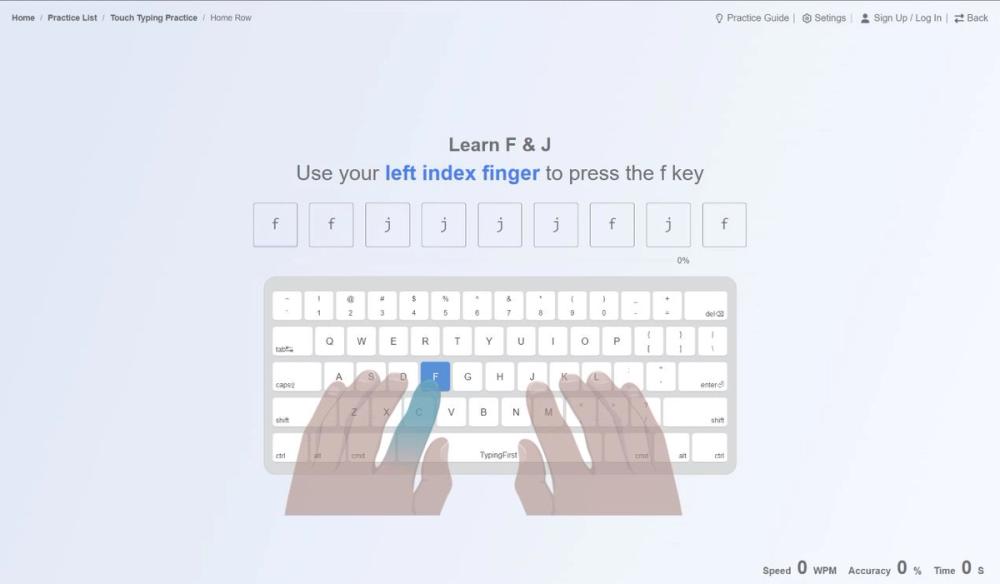
- Touch typing practice for beginners, with a focus on finger placement and basic keyboard familiarity.
- Ngram typing practice for common letter patterns and repeated typing movements.
- Paragraph typing practice for longer-form accuracy and rhythm.
- A structured learning path that moves from home row basics to symbols and more complex practice.
- Integrated reviews that combine new keys with previously learned skills.
- Visual performance analytics, including accuracy and speed analysis, weak-key identification, and WPM growth tracking.
Use Cases
TypingFirst is useful for learners who want to improve typing without jumping straight into speed tests. The public page emphasizes a curriculum, real-time visual feedback, and a minimalist interface, which suggests the product is designed to help users build habits gradually rather than chase a single high WPM score.
Teachers may also find it relevant for technology or keyboarding classes. One visible testimonial mentions using TypingFirst with technology students, where the structured path helps beginners and analytics help stronger students continue improving.
For adult learners, TypingFirst appears to support a practical learning path: touch typing keys, n-grams, common words, paragraph practice, and ongoing review. A careful user should still verify what is included in the free course versus premium drills before building a long-term practice plan around it.
Pricing
TypingFirst offers free online typing lessons and a free starting path. The page also references an upgrade, Plus, premium drills, and common patterns practice, but the fetched evidence does not show a full pricing table, billing terms, renewal details, or plan limits. Users should check the live TypingFirst website to confirm current Plus pricing, what premium drills include, and whether accounts are required for progress tracking.
User Experience and Support
The user experience is presented as focused and low-friction. The page mentions instant access, no complex setup, a minimalist interface, real-time visual feedback, gamified milestones, and structured reviews. Those signals point to a browser-based learning environment designed to keep attention on practice rather than configuration.
Support and documentation details are not clearly visible in the fetched evidence. The page shows sign-up and login signals, but it does not show a dedicated help center, support email, FAQ page, or teacher documentation in the captured content. Schools, parents, or teams should confirm how account issues, billing questions, and classroom use are supported.
Technical Details
TypingFirst appears to run as an online typing practice service accessible through the browser. The public evidence includes lesson categories, visual feedback, WPM tracking, weak-key identification, and performance analytics, but it does not specify browser requirements, mobile support, data export, keyboard layout support, accessibility details, or integrations with school systems.
The platform's technical value is mainly educational analytics: it helps users see accuracy, speed, weak keys, and progress over time. For classroom use, buyers should verify whether teacher dashboards, student management, reports, or privacy controls are available.
Pros and Cons
Pros
- Clear focus on structured typing improvement rather than one-off speed tests.
- Covers touch typing, n-gram practice, paragraph practice, reviews, milestones, and visual feedback.
- Free lessons make it approachable for beginners before considering Plus or premium drills.
- Performance analytics and weak-key tracking give learners more useful feedback than WPM alone.
Cons
- Full pricing, Plus limits, and premium feature boundaries are not visible in the fetched evidence.
- Support, documentation, and classroom administration details are not clearly shown.
- The available evidence comes from the primary page only, so deeper product pages were not verified.
- Users with specialized needs should confirm keyboard layouts, accessibility, exports, and device compatibility.
FAQ
What is TypingFirst?
TypingFirst is an online typing practice platform for improving typing speed, accuracy, and keyboarding skills. It includes touch typing, n-gram, and paragraph practice according to the public page.
Who is TypingFirst best suited for?
It appears best suited for beginners, students, adult learners, and serious typing learners who want a structured path. The site also includes a testimonial from a technology teacher using it with students.
What kinds of typing practice does TypingFirst offer?
The public page lists touch typing practice, ngram typing practice, and paragraph typing practice. It also mentions home row learning, complex symbols, integrated reviews, and common pattern drills.
Does TypingFirst track typing progress?
Yes, the page mentions visual performance analytics, comprehensive accuracy and speed analysis, weak-key identification, and WPM growth tracking over time.
Is TypingFirst free?
TypingFirst offers free online typing lessons and lets users start practice for free. The page also references Plus and premium drills, so users should verify current upgrade pricing and what is included in each plan.
Does TypingFirst provide support or documentation?
Support details are not clearly visible in the fetched evidence. Users should check the live site for help options, account support, billing support, or classroom documentation before relying on it for a school or team.
What should teachers or parents verify before using TypingFirst?
They should verify account requirements, student tracking, privacy settings, pricing, progress reports, classroom management features, and whether the practice path fits the learner's age and keyboarding goals.
Conclusion
TypingFirst presents a practical, structured approach to learning typing online. Its visible strengths are clear lesson types, focused practice, real-time feedback, and analytics that help learners improve beyond basic speed testing. Before upgrading or using it in a classroom, readers should verify Plus pricing, support routes, and any teacher or account-management features they need.