Introduction
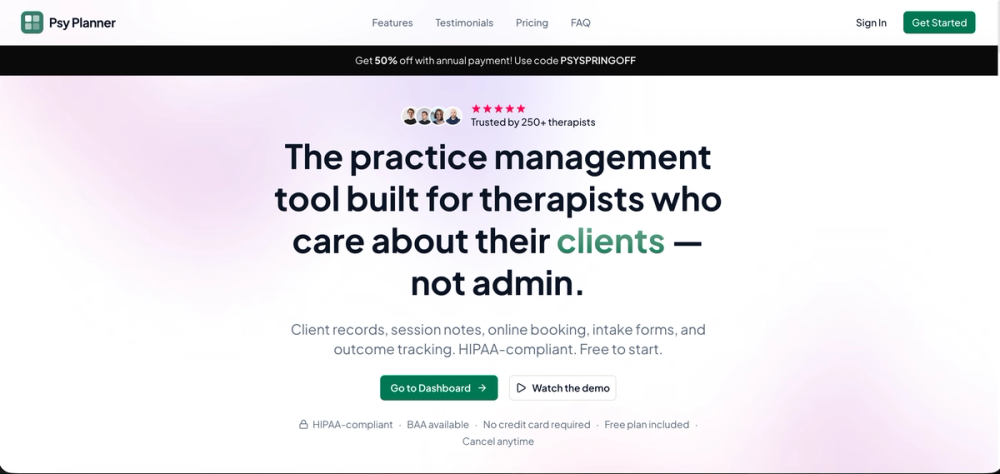
Psy Planner is practice management software for therapists and psychologists, with public copy focused on client records, session notes, intake forms, appointment scheduling, online booking, and outcome tracking. The product appears built for mental health professionals who want a single workspace for everyday practice administration rather than a collection of disconnected tools.
The clearest value of Psy Planner is its therapist-specific focus. It speaks to the practical work around sessions, clients, and scheduling, while also highlighting HIPAA-compliant storage, BAA availability, and a free way to start evaluating the platform.
Key Features
- Client records, session notes, intake forms, and scheduling connected in one workspace.
- Online booking that lets clients book appointments directly into the Psy Planner calendar.
- Appointment scheduling for planning, rescheduling, and tracking sessions.
- Outcome tracking, listed in the public product description.
- HIPAA-compliant practice-management positioning, with BAA availability mentioned on the page.
- A product demo video for prospective users who want to preview the experience.
- Free access messaging, no-credit-card language, and a stated upgrade path for practices that need more.
Use Cases
Psy Planner is most useful for therapists and psychologists who want to organize daily administrative work around client care. The public site emphasizes records, notes, intake forms, and scheduling together, which suggests a practical fit for clinicians who want fewer handoffs between appointment tools, document storage, and session workflows.
It also appears relevant for practices that want to simplify appointment booking. The site says clients can book directly into the Psy Planner calendar, which may reduce manual scheduling messages if the available booking controls match the practice's policies. A careful evaluator should check how availability, cancellations, reminders, and client access work before using it with real clients.
The outcome tracking mention may interest clinicians who want to monitor client progress, but the visible page does not explain the measures, forms, reporting options, or export capabilities. That makes it a feature to explore in a demo rather than something to assume will match every clinical process.
Pricing
The public page says Psy Planner offers a free plan and lets users start free before upgrading. It also states there are no hidden fees or long-term lock-ins, includes no-credit-card-required messaging, and shows an annual-payment promotion using code PSYSPRINGOFF with a stated $140 saving described as six months free. Because plan details and promotions can change, readers should verify current pricing, feature limits, annual terms, and cancellation rules before choosing a plan.
User Experience and Support
The site presents Psy Planner as "everything you need to run your practice - nothing you don't," which suggests a streamlined product rather than a large general-purpose business platform. Its visible workflow centers on practice tasks: client records, session notes, intake forms, scheduling, client booking, and outcome tracking. That is a useful starting point for evaluation, but clinicians will still need to test whether the note-taking flow, calendar behavior, and client experience feel comfortable in real use.
Support details are visible mainly through prompts and FAQ topics. The page includes "Talk to us," "Contact us," and FAQ questions about free trials, calendar integrations, direct booking, whether clients need to download anything, cancellation, and customer support. The fetched evidence does not show support hours, response-time commitments, onboarding packages, or a detailed help center, so practices with strict operational needs should ask those questions directly.
Technical Details
Psy Planner describes itself as HIPAA-compliant practice management software and says BAA availability is part of the offering. It also mentions HIPAA-secure storage, client records, session notes, intake forms, scheduling, online booking, outcome tracking, and calendar integration as a visible FAQ topic. These are meaningful signals for mental health practices, especially when evaluating whether a tool is suitable for client-related workflows.
The captured public evidence does not name supported calendar providers, integration setup steps, data export options, role permissions, mobile access, audit logs, or migration tools. Those details can matter for group practices, compliance review, and long-term data portability. They should be confirmed before Psy Planner becomes the main operational system for a practice.
Pros and Cons
Pros
- Clear therapist and psychologist focus instead of generic small-business scheduling.
- Combines several practice tasks: records, notes, intake forms, scheduling, booking, and outcome tracking.
- Free plan and no-credit-card messaging make it easier to evaluate before paying.
- Public copy mentions HIPAA-compliant storage and BAA availability, both important for mental health software evaluation.
- Direct client booking can reduce scheduling friction if the controls match a practice's workflow.
Cons
- The fetched evidence comes from the primary page only, so deeper implementation detail is limited.
- Calendar integration is raised as an FAQ topic, but supported calendars are not named in the captured copy.
- Outcome tracking is listed but not explained in terms of measures, reporting, templates, or exports.
- Support signals are present, but support channels and response expectations are not fully described.
- Larger or multi-provider practices may need more detail on roles, permissions, migration, and compliance workflows.
FAQ
What is Psy Planner?
Psy Planner is practice management software for therapists and psychologists. The public page presents it as a workspace for client records, session notes, intake forms, appointment scheduling, online booking, and outcome tracking.
Who is Psy Planner best suited for?
Psy Planner appears best suited for solo clinicians and therapy practices that want a focused way to manage practice administration. It is especially relevant for professionals looking to reduce tool-switching around scheduling, notes, intake, and client records.
Can clients book appointments directly?
Yes. The public page says clients can book appointments directly into a Psy Planner calendar. Practices should verify booking rules, availability controls, reminders, cancellation settings, and the client-facing experience before using it live.
Does Psy Planner include HIPAA-related features?
The site states that Psy Planner is HIPAA-compliant, mentions HIPAA-secure storage, and says a BAA is available. Clinicians should still review the BAA, terms, storage details, and internal compliance requirements before storing client information.
Is Psy Planner free to try?
The page says users can start free, that no credit card is required, and that a free plan is available. It also shows annual discount messaging, so readers should check the current pricing page or app flow for exact plan limits and upgrade terms.
Does Psy Planner integrate with calendars?
Calendar integration appears as a visible FAQ topic, and the product supports booking into a Psy Planner calendar. The captured evidence does not name specific external calendar providers, so users should confirm compatibility with their current calendar system.
What should therapists verify before adopting Psy Planner?
Therapists should verify note templates, intake customization, outcome tracking details, calendar integrations, client booking controls, data export, support availability, and BAA handling. These details determine whether the product fits real practice operations beyond the homepage summary.
Do clients need to download anything?
The page includes this as a FAQ question, but the captured evidence does not show the answer. Practices should ask whether clients can complete booking or intake through a browser, whether accounts are required, and what the client experience looks like.
Conclusion
Psy Planner gives therapists and psychologists a focused practice-management option centered on records, notes, intake, scheduling, booking, and outcome tracking. Its public page provides useful buying signals, including a free starting point, HIPAA-related language, BAA availability, and therapist-specific workflow messaging.
The product is worth evaluating if a practice wants a cleaner administrative workspace, but the decision should come after checking the details that are not fully visible on the homepage. Calendar compatibility, outcome tracking depth, support expectations, client experience, and data portability are the main areas to verify.