Introduction
Hintder presents itself as an AI dating wingman: you upload a screenshot of someone's dating profile, and the service drafts openers that aim to sound personal rather than generic. The public page targets people who want help with first messages and follow-up replies on apps such as Tinder, Hinge, and Bumble, without plugging directly into those platforms. Anyone evaluating the product should confirm how hints are billed and what happens to uploaded screenshots before relying on it for sensitive conversations.
Key Features
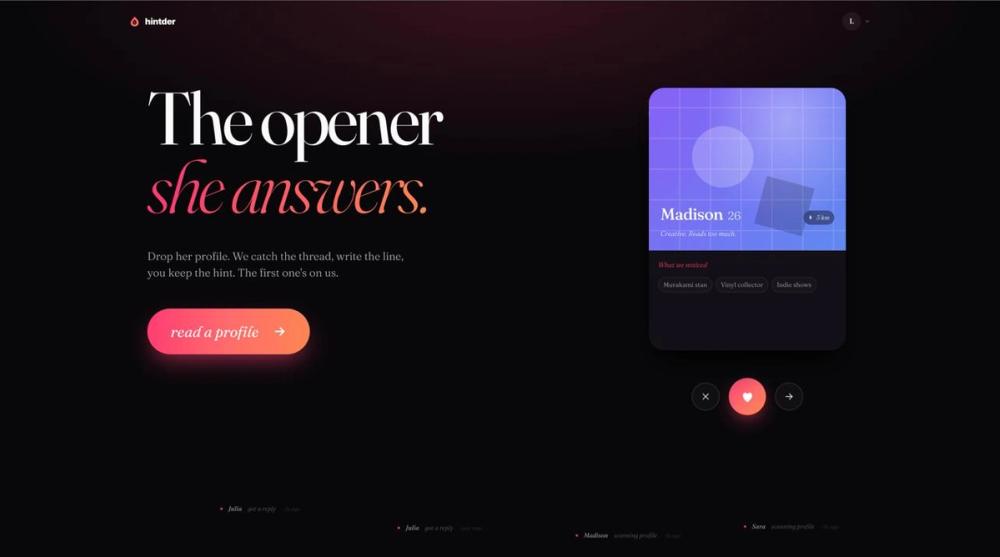
- Profile screenshot workflow - Drag a profile onto the scanner; the site describes extracting hooks from the image and showing what was read, how lines were written, and why they might work.
- Multiple opener options per hint - One hint reads one profile and drafts five openers in a chosen tone, according to the pricing and FAQ copy on the site.
- Reply coaching - Beyond the first line, the product is framed as coaching the next reply when a match responds, positioned for the stretch from first message toward a date.
- Tone tuned for dating apps - The site contrasts its output with generic AI chat: it emphasizes playful tension, profile-specific details, and lines that invite a real answer rather than polite, balanced phrasing.
- App-agnostic use - Works from screenshots across major dating apps; the site states it does not integrate into apps and that users stay anonymous and in control.
- Guides and Stories - Navigation includes Guides and Stories alongside Pricing and sign-in, suggesting editorial or educational content around the product.
Use Cases
The clearest fit is someone stuck on the opening message after matching-especially when a plain compliment (for example about a pet in a photo) fails to get a reply. The homepage illustrates that contrast: a generic "cute cat" line versus a profile-aware opener tied to details like travel, cooking, or hobbies.
Users who want structure without sharing account access to Tinder or Hinge may appreciate the screenshot-only model. You control what you upload and paste back into the app yourself.
If a conversation starts but the second message feels harder, the site positions Hintder for that moment as well-not only the opener. Results still depend on the other person's interest and timing; the public copy is explicit that non-replies can happen.
Pricing
The pricing page describes monthly subscription tiers-Lite, Plus, Pro, and unlimited Ultimate-with unused hints rolling over and the first three hints free; cancel anytime is stated on the product metadata. Monthly and yearly billing appears, with yearly shown at a discount (the page mentions −15% on yearly). A hint is defined as one AI move: reading a profile into openers or coaching a reply; a few hints can carry a match from first message toward a date.
Separate copy on the site also describes hints that do not expire, do not auto-renew, and do not roll into a subscription, with the first three free without card or signup-readers should reconcile subscription versus pay-as-you-go language on the live pricing page before purchase. Plan switching, what "unlimited" means on Ultimate, and cancellation steps are listed as common questions on the pricing view.
User Experience and Support
The flow is presented in three steps: drag a profile to the scanner, review extracted hooks and drafted lines, then copy a line and send it in your dating app. Try free and Sign in appear in the header, and the first opener is described as free without card or signup for initial trials.
Support signals include Guides, Stories, an on-site FAQ ("You probably want to know a few things"), and a Privacy Policy link for screenshot retention. The page does not prominently list live chat, phone, or a dedicated help desk email in the fetched copy-buyers who need hands-on support should look for contact options on the live site.
Technical Details
The public site does not document APIs, SDKs, browser extensions, or backend stack in the material reviewed. Operation appears web-based around image upload and text generation. There is no claim of direct integration with dating app APIs; compatibility is described purely through screenshots. Technical buyers should not assume export formats, team accounts, or automation beyond what the web product shows.
Pros and Cons
Pros
- Clear, visual workflow from screenshot to multiple tailored openers.
- Stated compatibility with any app you can screenshot, without app plugins.
- Transparent FAQ on screenshot retention (up to 30 days, then deleted; not used to train models per site copy) and on sounding human rather than "AI cadence."
- Free first hints and rollover subscription hints may suit light or regular use, depending on the plan you choose.
Cons
- No guaranteed replies; the site itself notes busy matches and competing messages.
- Technical and integration detail is thin on the public pages-mostly a consumer web tool.
- Pricing narrative mixes subscription and non-subscription hint descriptions; verification on the pricing page is important.
- Support channels beyond FAQ, guides, and policy links are not clearly spelled out in the fetched content.
FAQ
What is Hintder AI and what problem does it address?
Hintder is marketed as your AI dating wingman: upload a dating profile screenshot, get openers that aim not to sound like everyone else, and use reply coaching through the conversation. The problem it targets is weak first messages and awkward follow-ups on dating apps.
Who is Hintder best suited for?
It appears aimed at people actively using swipe or profile-based dating apps who want help drafting witty, specific openers and second messages. It may be less relevant for users who already consistently get replies without assistance or who do not want to upload profile screenshots to a third-party service.
What can users verify from the public site about features?
You can verify the screenshot scanner flow, examples of "what we noticed" on sample profiles, the five-openers-per-hint description, subscription tier names, rollover hints, free first three hints, and FAQ answers on apps supported, privacy, and comparison to general-purpose chat AI.
How does Hintder handle dating app screenshots and privacy?
The site states screenshots are kept up to 30 days so you can reopen a match and see the photo report, then automatically deleted; they are not used to train AI models, sold, or archived past that window, with more detail pointed to the Privacy Policy. Confirm the current policy on hintder.ai before uploading sensitive images.
Does Hintder work with Tinder, Hinge, and other apps?
The FAQ states it works with all of them-including Tinder, Hinge, Bumble, and Coffee Meets Bagel-if you can screenshot the profile. It does not plug into any app; you remain anonymous and in control in the sense that you paste messages yourself.
How is Hintder different from asking ChatGPT for openers?
The site argues general chat AI optimizes for polite, balanced tone that performs poorly on dating apps, while Hintder is tuned for playful tension, profile specifics, and lines that invite a real reply. That is positioning copy rather than independent benchmarking.
What should I check on pricing before subscribing?
Confirm current Lite, Plus, Pro, and Ultimate prices, monthly versus yearly billing, what "unlimited" means, whether hints roll over as stated, cancellation steps, and whether pay-as-you-go hints still apply alongside subscriptions-the live pricing page is authoritative.
Conclusion
Hintder AI focuses on screenshot-based dating openers and reply coaching for people who want more distinctive first messages on major apps. The public site offers a try-free entry, subscription hints with rollover, and explicit privacy limits on stored screenshots. Visit hintder.ai and the pricing page to confirm plans, policies, and support options before you upload profiles or pay.