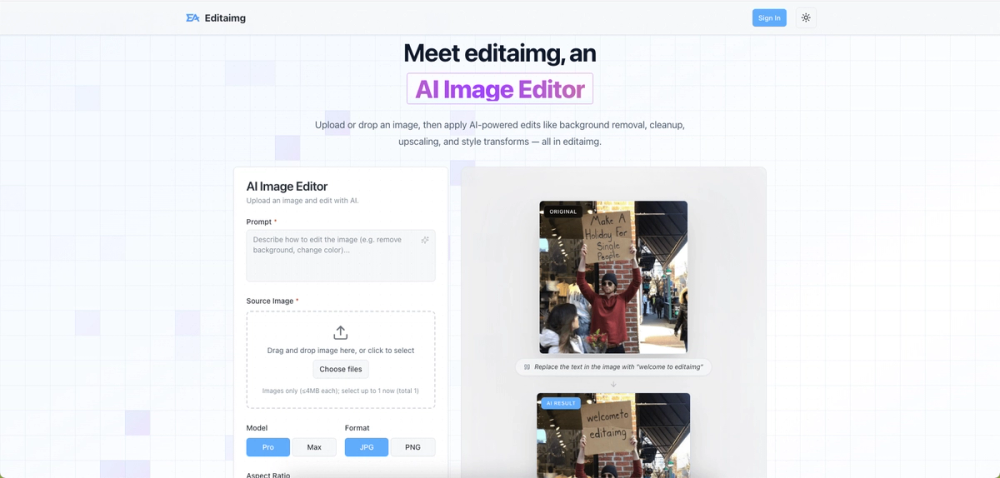
Introduction
Editaimg is a browser-based AI image editor that handles background removal, image upscaling, text editing within images, jewellery retouching, watermark removal, style transforms, and several other photo manipulation tasks. The tool operates on a prompt-based interface - upload an image, describe the edit you want, and the AI processes it directly in the browser. For small business owners, social media managers, and casual users who need quick image edits without learning Photoshop, the pitch is straightforward: describe the change, get the result.
Key Features
- Prompt-Based Image Editing - Upload an image and type a natural-language description of the edit. The AI interprets instructions like "remove people from the background" or "replace the text with 'welcome'" and applies the change.
- Background Removal - One-click background isolation for product photos, portraits, and composites. The tool handles edge detection and subject separation without manual masking.
- Image Upscaling - Increase resolution while preserving detail, useful for enlarging product photos or social media assets that were captured at lower quality.
- Jewellery Retouching - A specialized tool designed for jewellery product photography, handling sparkle enhancement, background cleanup, and detail sharpening specific to jewellery imagery.
- Text Editing Within Images - Replace or modify visible text in an image without regenerating the entire scene, practical for correcting labels, signage, or overlay text.
- Style Transforms - Apply artistic styles, color grading, and lighting adjustments to restyle images without manual filter tuning.
- AI Image Translator - Translate visible text within an image to another language while preserving the original layout and typography.
- Watermark Removal - Remove watermarks or unwanted overlays from images using AI-based inpainting.
- Batch Upload - Upload up to 8 images at once (50 MB each) for processing multiple edits in a single session.
Use Cases
For e-commerce sellers who need clean product photos with white or transparent backgrounds, the background removal tool eliminates the manual masking step that typically requires desktop editing software. The batch upload feature makes it practical to process a product catalog in one session.
For social media managers who need to adjust text overlays, swap backgrounds, or restyle images for different platforms, the prompt-based interface reduces the back-and-forth with a designer for routine visual tweaks.
For jewellery retailers, the specialized retouching tool addresses a specific product photography need - enhancing sparkle and cleaning up backgrounds on gemstone and metalwork images - that general-purpose editors handle poorly.
For content creators working across languages, the image translator lets them localize text-heavy graphics (infographics, social posts, signage) without recreating the design from scratch in a different language.
Pricing
The site advertises "free to start" with no sign-up required for initial use. A pricing page exists, though the specific tier details are not fully visible on the fetched homepage. The tool appears to operate on a freemium model where basic edits are available for free and more advanced features or higher volume may require a paid plan. Readers should check the Editaimg pricing page for current plan details.
User Experience and Support
The interface is minimal: upload an image, type your edit instruction, and preview the result. A sign-in option exists for accessing generation history. The site lists contact via email and provides links to Privacy Policy, Terms of Service, and Refund Policy. An FAQ section is linked in the navigation. The tool has been featured on multiple launch directories, suggesting some community validation.
Technical Details
Editaimg is a web-based application that processes images through AI models. The prompt-based editing interface suggests the use of large multimodal models capable of understanding natural-language image editing instructions. The tool supports images up to 50 MB each with batch uploads of up to 8 files. Processing appears to happen server-side, as the tool handles complex operations like inpainting, upscaling, and style transfer that exceed typical browser-based processing capabilities.
Pros and Cons
Pros
- Prompt-based interface makes complex edits accessible to non-designers
- Specialized tools for jewellery retouching and image translation address niche needs
- Batch upload supports processing multiple images in one session
- No sign-up required for initial use
- Background removal, upscaling, and text editing cover common editing tasks in one tool
Cons
- Pricing details for paid tiers are not transparently displayed on the homepage
- Server-side processing means images are uploaded, which may concern users with sensitive content
- AI interpretation of prompts can be inconsistent - complex instructions may not produce expected results
- No visible API or integration with design tools like Figma or Canva
- The tool's accuracy on edge cases (complex backgrounds, fine details) is not documented
FAQ
What is Editaimg?
Editaimg is a browser-based AI image editor that lets you edit photos using natural-language prompts. You can remove backgrounds, upscale images, edit text within photos, retouch jewellery, remove watermarks, and apply style transforms - all by describing the change you want.
Do I need to create an account?
No. You can upload images and apply edits without signing in. An optional account lets you access your generation history and previous results.
How does the prompt-based editing work?
Upload an image and type a description of the edit you want, such as "remove the background" or "replace the text with 'hello'." The AI interprets the instruction and applies the change to the image.
What image formats and sizes are supported?
The tool accepts image files up to 50 MB each. You can upload up to 8 images in a single batch. Specific supported formats are not listed on the homepage - check the site for current details.
Is there a free plan?
The site advertises "free to start" with no sign-up required. Specific free-tier limits and paid plan pricing should be verified on the Editaimg pricing page.
Can I use it for commercial product photography?
Yes. The tool includes specialized features for product photography, including jewellery retouching and background removal. However, readers should verify the licensing terms for commercial use on the site's Terms of Service page.
Conclusion
Editaimg covers a practical range of image editing tasks - background removal, upscaling, text editing, and niche needs like jewellery retouching - in a single browser-based tool. The prompt-based interface makes these capabilities accessible to users without design software experience, which is the tool's strongest differentiator. The free-to-start model lowers the barrier for evaluation, though readers should verify the paid plan pricing and data handling practices before committing to regular use for sensitive or commercial imagery.