Introduction
Cursive Generators hosts a free cursive text maker that lets visitors type a word, name, or phrase and either copy Unicode "cursive" characters for social platforms or download real-font output as PNG or SVG. The public page stresses instant use with no sign-up, payment, or credits. Anyone choosing between copy-paste text and image export should read how the site explains Unicode versus downloadable fonts-rendering can differ by app and device.
Key Features
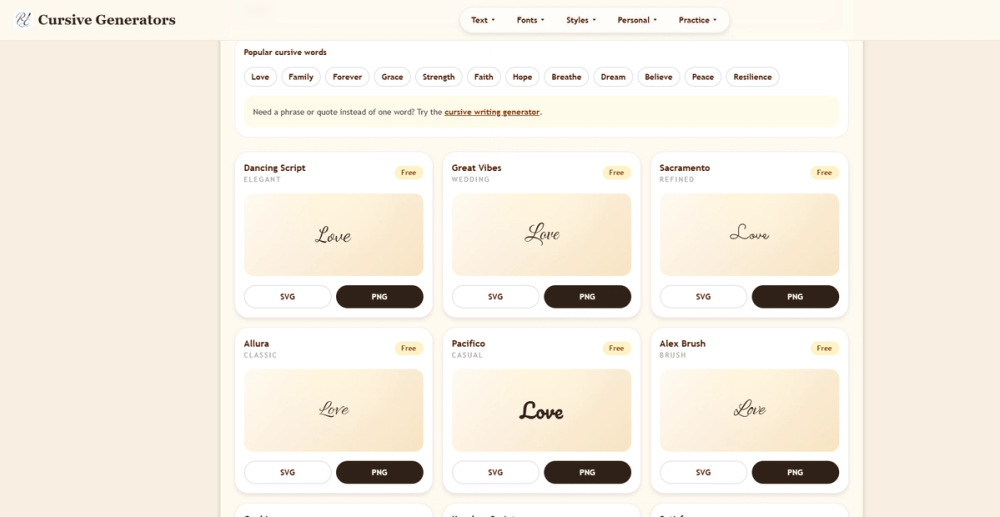
- Dual output paths: Copy & Paste Unicode styles (the page cites 35 variants) and Real Fonts previews (36 cursive font cards)
- PNG and SVG export generated in the browser for real-font selections
- Style grid spanning handwriting, script, bold, casual, elegant, wedding, calligraphy, Old English, Chicano, and related categories in the site navigation
- Unicode variants including script, bold script, italic, small caps, fullwidth, spaced, and decorative wrapped forms
- Linked specialty tools in the menu: signature, tattoo, names, letter and number generators, logo and stencil creators, worksheets, alphabet chart, and Russian Cyrillic letters
- Blog and guides on handwriting, cursive instruction, tattoos, and wedding invitation fonts
- Mobile-friendly layout with stacked cards and a simple main input
Use Cases
Social users who want decorative bios or captions for Instagram, TikTok, or Discord can copy Unicode output in one step when compatibility is acceptable. The site notes that Unicode does not install a font on those apps-it relies on characters many devices already include, with possible fallback or missing-glyph issues on older systems.
Design and print-oriented tasks-email signatures, PDFs, wedding graphics, slides, Canva layouts, or tattoo references-may fit PNG (transparent images) or SVG (scalable vectors) from real-font mode. The page suggests signatures often need a clean transparent PNG, tattoo ideas a high-contrast style an artist can redraw, and brand mockups SVG for scaling without blur.
Educators and parents browsing the Practice and Learn Cursive sections can pair the generator with alphabet charts, worksheets, and letter guides; some single-letter guides are published with more listed on a visible roadmap.
Pricing
The homepage and meta description describe a free cursive generator: no login, credits, or payment required to create text and download results. No paid tiers or subscription language appeared on the fetched page. Confirm the live site if commercial licensing or usage limits for exported fonts matter for your project.
User Experience and Support
Workflow on the main generator: type text, preview across styles, then copy Unicode or export SVG/PNG from a real-font card. The site documents when to use each format-copy for speed, SVG for scalable artwork, PNG for documents and quick sharing.
Support is primarily self-serve through on-page explanations, the blog ("All Guides"), and topical articles such as how to make a cursive signature or choose fonts for tattoos and invitations. No dedicated support email or chat was visible on the fetched homepage; deeper help likely lives in linked guide pages.
Technical Details
Real-font downloads are produced client-side in the browser. SVG is positioned for crisp scaling; PNG for everyday documents and social graphics. Unicode mode outputs plain text characters, which keeps paste workflows light but shifts rendering responsibility to each platform's font fallback.
The property links to many sub-tools (text converter, font images, typing animation, etc.) under the Cursive Generators brand. Discord is mentioned as a paste target for Unicode styles, not as an official integration.
Pros and Cons
Pros
- Free access without account friction for quick name, quote, or bio experiments
- Clear split between fast Unicode copy and consistent image export
- Large style catalog and related generators in one navigation tree
- Educational content for handwriting and font-choice questions
- Explains Unicode limitations (compatibility, screen readers) alongside image benefits
Cons
- Unicode output may show missing boxes or unexpected fonts on some apps
- Only the main homepage was fully reflected in this profile's fetch-pricing or policy pages may hold extra terms
- Not a full desktop font manager or licensed font marketplace
- Tattoo and wedding use cases still need human judgment on legibility and artist adaptation
- Commercial rights for specific embedded fonts are not detailed on the fetched page-verify before paid client work
FAQ
What is Cursive Generators and how is it different from a font install?
It is a web-based cursive generator at cursivegenerators.org that converts typed text into either Unicode copy-paste styles or downloadable PNG/SVG images using real-font previews. It does not install fonts on your phone or social apps; Unicode mode uses existing character sets, while image mode preserves a fixed visual style.
Who should use Unicode copy-paste versus PNG or SVG?
Unicode suits short decorative text in bios, captions, Discord names, and messages when you can test how it looks on target devices. PNG or SVG fits signatures, invitations, slides, PDFs, and tattoo references where consistent appearance matters more than editable text.
Is Cursive Generators free to use?
The public page states the tool works without login, credits, or payment and invites users to try it free with instant access. There were no paid plans on the fetched homepage; check the site for any future changes.
Can I use Cursive Generators for tattoo or wedding design?
The site lists tattoo ideas, wedding graphics, and invitation font guides among use cases and offers high-contrast and elegant styles. Final tattoo or print work should still be reviewed with a professional; exported images are references, not guaranteed unique licensed artwork unless terms say otherwise.
Why does my copied cursive look wrong in one app?
The homepage explains that Unicode cursive can render differently across devices and that some apps may show fallback fonts or missing glyphs. Testing on the target platform-or switching to PNG/SVG export-addresses consistency issues Unicode cannot fully control.
What other tools sit under the same site?
Navigation links include signature and name generators, letter and number tools, logo and stencil creators, practice worksheets, Cyrillic letters, and a blog with handwriting tutorials. Those pages extend the core generator for specialized text and learning tasks.
Conclusion
Cursive Generators combines Unicode copy-paste cursive with browser-generated PNG and SVG exports, free entry, and a wide style grid for social, design, and learning scenarios. Pick Unicode for quick decorative text after a compatibility check, or real-font exports when visual consistency matters. Explore linked guides when you need handwriting or font-choice context beyond a one-off preview.