Introduction
AI Text Cleaner HumanFlow is a free web-based tool designed to strip the robotic patterns out of AI-generated text and rewrite it into something that reads like a human wrote it. The core premise is straightforward: paste your AI draft, let the tool clean and humanize it, then copy the result. No signup, no account, no cost to try.
For anyone who uses AI writing assistants regularly, the output often carries telltale markers: repetitive phrasing, overused transitional words, stiff sentence structures, and a tone that feels vaguely corporate. HumanFlow targets those patterns specifically, aiming to preserve the meaning while smoothing out the language until it sounds natural.
Key Features
AI Pattern Removal
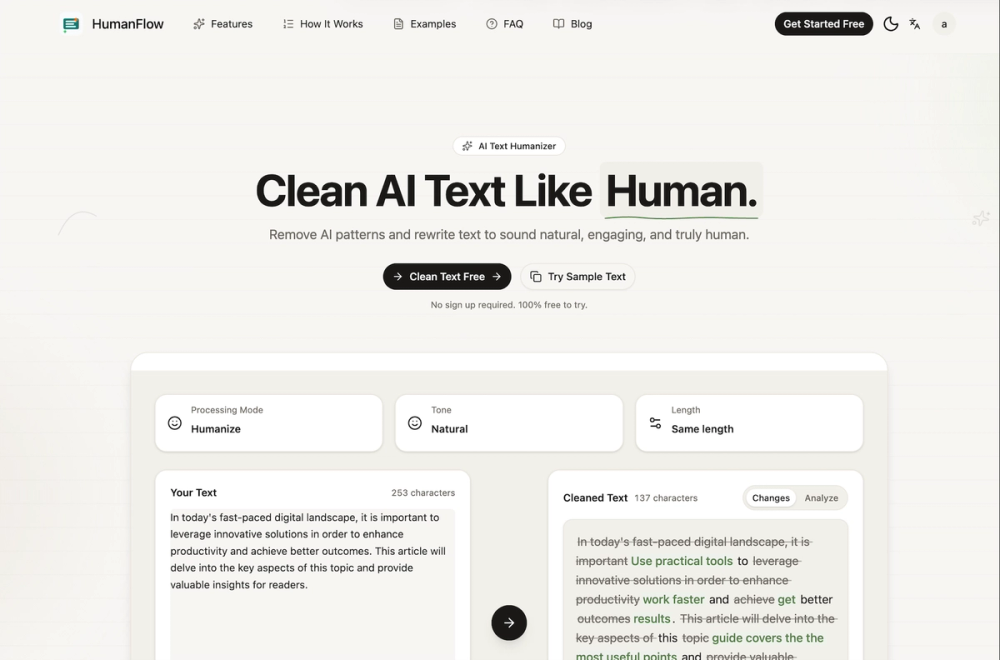
The tool identifies and eliminates common AI writing patterns: overused filler phrases, repetitive sentence starters, unnatural transitions, and the kind of inflated language that makes a paragraph sound like a press release rather than a conversation. The sample on the site shows a before-and-after where vague corporate phrasing is replaced with direct, specific language.
Humanization Engine
Beyond simply deleting patterns, the tool rewrites sentences to sound more natural. The example demonstrates how phrases like "leverage innovative solutions" become "use practical tools" and "achieve better outcomes" becomes "get better results." The emphasis is on clarity and conversational tone rather than fancy vocabulary.
Three-Step Workflow
The process is deliberately minimal: paste your text, let the AI clean and humanize it, then copy the result. The site explicitly states this takes three steps and requires no account creation. The workflow is designed for speed rather than depth.
Character Count and Change Tracking
The editor displays character counts for both input and cleaned output, along with a changes analysis that shows what was modified. This transparency helps you understand what the tool actually changed rather than blindly accepting the output.
Advanced Options
An "Advanced Options" toggle suggests additional controls are available beyond the basic cleaning, though the evidence does not elaborate on what those options include. The presence of a "Clear Copy" button and the statement about secure processing indicate attention to the full user workflow.
Privacy-First Processing
The site states that data is processed securely and not stored. For a tool that handles potentially sensitive text content, this is a meaningful claim, though readers should verify the actual privacy policy for confirmation.
Use Cases
Content Creators and Bloggers
Writers who use AI to draft blog posts, articles, or social media content can run their output through HumanFlow to remove the telltale AI patterns before publishing. This is particularly useful for maintaining a consistent human voice across content that was partially AI-assisted.
Email and Business Communication
AI-drafted emails often sound overly formal or verbose. The tool can tighten up professional correspondence to make it read more naturally without losing the key message.
Academic and Essay Writing
Students or researchers who use AI for drafting can use the cleaning tool to make their writing sound more authentic, though this use case raises questions about academic integrity that readers should consider carefully.
Social Media Posts
Short-form content benefits from the humanization pass, especially when the AI output feels too polished or generic for the platform's tone.
Marketing Copy
Marketing teams using AI to generate ad copy, landing page text, or product descriptions can clean the output to match their brand voice before publishing.
Non-Native English Speakers
Writers who use AI to translate or draft content in English can benefit from the humanization pass to make their final output sound more natural and less like machine-generated text.
Pricing
The site describes the tool as "100% free to try" and does not require signup. The sample text feature works without an account. Whether the tool remains entirely free for ongoing use or has limitations beyond the initial trial is not explicitly stated on the main page. The "Try Sample Text" button and "Clean Text Free" call-to-action suggest the core functionality is accessible without payment, but readers should check for any usage limits or premium tiers.
User Experience and Support
The interface is clean and focused. The editor area dominates the page, with a clear three-step flow described above it. The "Try Example" button lets you see the tool in action before pasting your own content, which is a thoughtful onboarding choice.
The site includes a testimonial from a content creator named Sarah Johnson, though this is a single data point rather than a comprehensive review section. The FAQ section provides additional context about how the tool works.
Support channels are not prominently detailed on the main page. The self-service nature of the tool suggests that users are expected to evaluate the output themselves rather than relying on support for quality assurance.
Technical Details
The tool is web-based and operates at anyformatlocal.com. The site does not disclose specific frameworks, programming languages, or whether the processing happens client-side or server-side. The privacy statement about secure processing and non-storage suggests server-side processing with short-lived data handling.
The character count display and change analysis indicate real-time or near-real-time processing rather than batch operations. The advanced options feature suggests a more sophisticated processing pipeline than a simple find-and-replace approach.
The site mentions the tool works for articles, emails, essays, and social posts, suggesting it handles both long-form and short-form content with appropriate adjustments.
Pros and Cons
Pros:
- Free to try with no signup required
- Focused specifically on AI text patterns rather than generic paraphrasing
- Transparent change analysis shows what was modified
- Simple three-step workflow
- Privacy-first processing claim
- Works across multiple content types
- Immediate access via sample text feature
Cons:
- Free trial limitations are not explicitly stated
- Only one testimonial visible on the main page
- Advanced options details are not visible in the evidence
- No mobile app mentioned
- Support channels are not prominently displayed
- Quality of humanization may vary depending on the input text
- No integration with writing platforms or content management systems mentioned
FAQ
What does AI Text Cleaner HumanFlow do?
It takes AI-generated text and rewrites it to remove robotic patterns, filler phrases, and unnatural phrasing. The goal is to make the output sound like a human wrote it while preserving the original meaning and key points.
Is it really free?
The site states it is 100% free to try and does not require signup. The sample text feature works without an account. Whether there are usage limits or premium tiers beyond the initial experience is not explicitly detailed on the main page.
How is this different from a paraphrasing tool?
Standard paraphrasing tools change words while preserving structure. HumanFlow specifically targets AI writing patterns - the repetitive transitions, inflated phrasing, and corporate tone that characterize machine-generated content. The focus is on making text sound natural rather than just different.
What types of text can I clean?
The site mentions articles, emails, essays, and social posts as supported content types. The tool appears to handle both long-form and short-form content, adjusting its approach based on the text length and structure.
Is my text stored or shared?
The site states that data is processed securely and not stored. This suggests the tool processes your text and discards it after delivering the result. Readers should verify the actual privacy policy for confirmation.
Can I see what changed?
Yes. The tool displays a changes analysis showing what was modified in the text, along with character counts for both input and output. This transparency helps you evaluate whether the changes are appropriate.
Do I need to create an account?
No. The site explicitly states "no sign up required" and the core functionality appears accessible without account creation.
Conclusion
AI Text Cleaner HumanFlow fills a specific niche in the AI writing tool landscape: it targets the gap between raw AI output and publishable human-sounding text. The free, no-signup model makes it easy to try, and the focused approach on AI-specific patterns rather than generic paraphrasing gives it a clear identity. For anyone who regularly uses AI writing assistants and finds the output needs a human pass before publishing, this tool offers a quick way to smooth out the most obvious machine-generated markers. The privacy-first positioning and transparent change analysis add practical value. As with any AI cleaning tool, the quality of the output will depend on the input, and readers should evaluate the results critically before relying on them for important content.