Introduction
Codeown is presented as a developer-focused platform for sharing projects, documenting a build-in-public journey, and shaping a professional technical identity. The public page makes its clearest case for builders who want more than a static portfolio: it combines project showcasing, community feedback, GitHub-related signals, and developer profile elements into one visible space. A careful evaluator should still verify account setup, long-term pricing, and moderation or community rules before relying on it as a primary professional presence.
Key Features
- Developer project profiles that go beyond a simple repository link, with support for richer project pages, image sliders, technical specifications, and GitHub metadata references.
- A build-in-public positioning that encourages developers to document progress, contribution streaks, launches, and the unfinished work behind final releases.
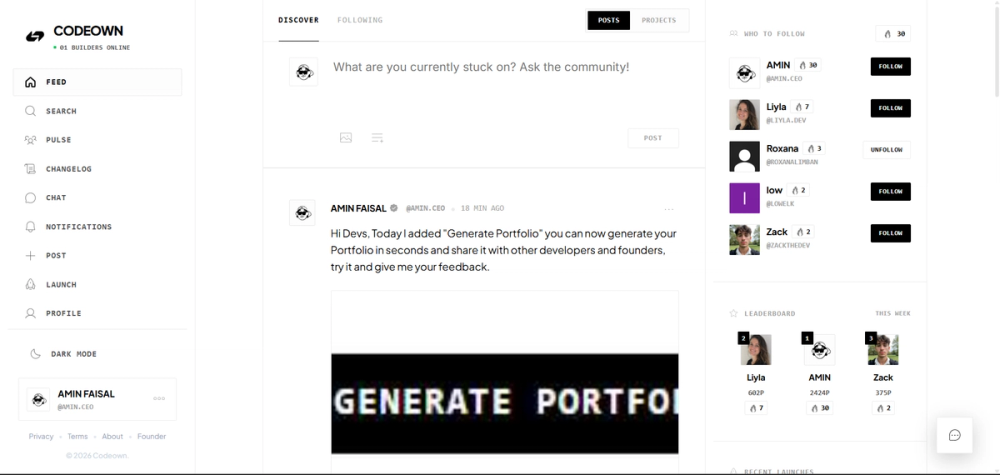
- A "Pulse" system, real-time heartbeats, and contribution streaks designed to make consistent activity visible inside the community.
- Real-time messaging, comments, likes, follower features, and push notifications for peer feedback and collaboration signals.
- A Developer ID Card that summarizes a developer's tech stack, impact score, and successful launches in a shareable profile format.
- A dark-mode-first interface, with the public page naming React, Supabase, and Node.js as part of the platform stack.
Use Cases
Codeown is likely most useful for developers who want to show the process behind their work, not just the final repository. A personal site or GitHub profile can show code and completed projects, while Codeown appears designed to add context around progress, daily engagement, community response, and the developer's broader professional identity.
It may also fit early-stage builders who want feedback while they are shipping. The site highlights comments, likes, direct messages, followers, notifications, and discovery logic for surfacing relevant projects, which suggests a social layer around technical work rather than a private project tracker.
For recruiters, collaborators, or potential co-founders, the most useful parts may be the richer project pages and Developer ID Card. Those elements can make a developer's stack, launches, and public activity easier to scan, though readers should verify how profile visibility, discovery ranking, and account controls work inside the actual product.
Pricing
The public page says Codeown is free for open source contributions and personal builds. It does not show a detailed pricing table, paid plan limits, billing terms, or enterprise options in the fetched page evidence. Developers who plan to use Codeown as a long-term portfolio or community channel should confirm whether any future paid tiers, usage limits, premium profile features, or commercial project restrictions apply.
User Experience and Support
Codeown's public page describes a dark-mode-first design approach with visual hierarchy, micro-animations, gradients, and a focus on reducing cognitive load. The product appears to emphasize presentation quality for developer work, especially through project pages, profile surfaces, and shareable identity elements.
Support signals are more community-oriented than documentation-oriented in the visible evidence. The site mentions real-time messaging, comments, likes, notifications, and direct inquiries, but it does not clearly show a help center, documentation portal, email support route, or service-level support information. New users should check what onboarding, account help, and moderation support are available after sign-up.
Technical Details
The public page names React, Supabase, and Node.js as part of Codeown's architecture. It also mentions direct integration with GitHub metadata, which is relevant for developers who want project pages to reflect repository-linked information.
The site does not expose API documentation, export formats, deployment details, authentication options, or integration settings in the visible page evidence. That makes Codeown easier to evaluate as a public developer-profile and community platform than as a developer infrastructure product. Teams or advanced users should verify GitHub connection permissions, data portability, and integration depth before making it a central part of their workflow.
Pros and Cons
Pros
- Clear positioning for developers who want to document projects, launches, and build-in-public progress in one place.
- Richer project presentation than a plain repository link, with visible references to image sliders, technical specifications, and GitHub metadata.
- Community features such as comments, likes, messaging, followers, and notifications may help builders receive feedback while shipping.
- The Developer ID Card gives the product a concrete profile artifact that can be useful for sharing a professional developer identity.
Cons
- Detailed pricing is not visible beyond the statement that open source contributions and personal builds are free.
- Public documentation, support routes, privacy details, and account control information are not clearly shown on the fetched page.
- Discovery and featuring depend on factors such as project complexity and community engagement, so users should not assume equal visibility for every project.
- The product's value depends partly on community activity, which readers should evaluate directly before investing significant profile-building effort.
FAQ
What is Codeown used for?
Codeown is presented as a platform for developers to share projects, build professional identities, and collaborate around code. Its public page focuses on project showcasing, build-in-public documentation, developer profile presentation, and community feedback.
Who is Codeown suited for?
Codeown appears well suited for developers, indie builders, open source contributors, and technical creators who want a public place to document their work over time. It may be especially relevant for people who want to show progress, project context, and community engagement rather than only finished code.
What can developers show on Codeown?
The site mentions rich project pages, high-resolution image sliders, technical specifications, GitHub metadata, contribution streaks, a Pulse system, and a Developer ID Card. These signals suggest that users can present both project details and broader professional identity cues.
Is Codeown free to use?
The visible FAQ says Codeown is free for open source contributions and personal builds. The public page does not show full paid-plan details, so users should verify whether any premium features, commercial-use limits, or future pricing rules apply.
How does Codeown handle project discovery and featuring?
The public page says projects with high technical complexity and strong community engagement are automatically prioritized in the discovery feed. That gives users a general idea of the ranking logic, but developers should verify how discovery works in practice and whether there are profile, category, or activity requirements.
Does Codeown integrate with GitHub?
The site references direct integration with GitHub metadata for project presentation. It does not show detailed permission scopes or setup instructions in the visible evidence, so developers should review the GitHub connection flow before linking important repositories.
What should users verify before relying on Codeown as a portfolio?
Users should check profile visibility controls, account settings, GitHub permissions, data portability, moderation policies, and long-term pricing. These details matter if Codeown becomes part of a developer's professional identity rather than a casual project-sharing channel.
Conclusion
Codeown offers a focused space for developers who want to turn ongoing technical work into a more visible professional profile. Its strongest visible value is the mix of project showcasing, build-in-public signals, social feedback, and a shareable Developer ID Card. Before making it a primary portfolio destination, users should confirm pricing, support, account controls, and integration details directly on the product.