Introduction
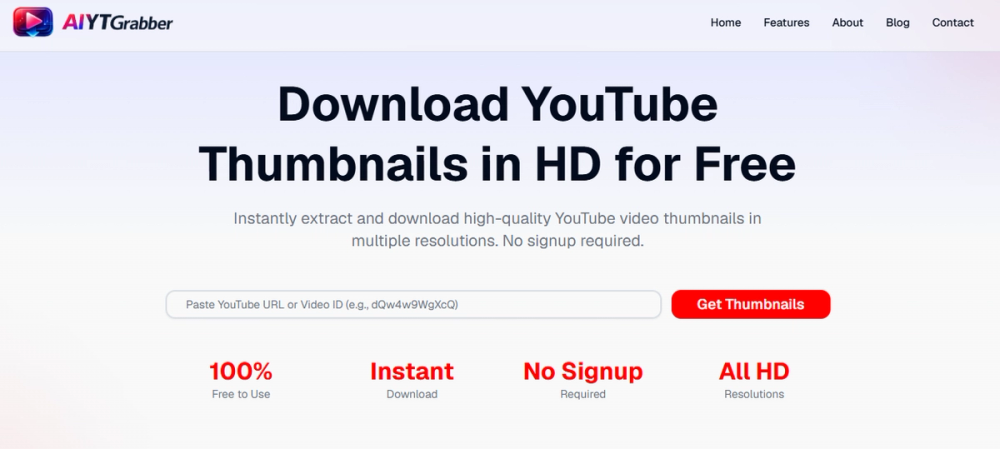
AIYT Grabber is a free browser-based YouTube Thumbnail Downloader for extracting preview images from YouTube videos and Shorts. The public site presents it as a simple tool for creators, marketers, researchers, educators, and content teams who need quick access to thumbnails in multiple resolutions without installing software or creating an account.
The clearest value is speed and convenience: users paste a YouTube URL or video ID, generate available thumbnail options, then download a preferred version or copy the image URL. A careful user should still verify usage rights before republishing any downloaded thumbnail, especially for commercial or public-facing projects.
Key Features
- Extracts thumbnails from YouTube video URLs, Shorts links, or the 11-character video ID.
- Shows multiple resolution options, with visible site references to sizes from 120x90 up to 1280x720 and quality labels such as maxres, sd, hq, and mq.
- Works directly in the browser, so users do not need to install a desktop app or extension.
- Requires no registration, account setup, or sign-in before using the downloader.
- The site states that downloads are free, unlimited, and not locked behind premium features.
- Contact and FAQ pages provide basic support signals, including an email address and guidance on file formats, data handling, and usage rights.
Use Cases
AIYT Grabber is most relevant for people who work with YouTube visuals and need thumbnail files for legitimate review, planning, or reference. A creator might use it to archive their own video thumbnails, compare thumbnail styles across a content series, or collect examples before redesigning a channel's visual identity.
Marketing and content teams may find it useful when researching competitors, planning social media promotion, or studying how thumbnails affect click appeal. The tool is not a design editor; it does not appear to create new thumbnails or optimize images. Its role is narrower and more practical: retrieve available YouTube thumbnail images quickly.
Educators and researchers may also use a YouTube Thumbnail Downloader when preparing presentations, studying media examples, or documenting video content. In those cases, the most important caveat is rights management. The site points users toward DMCA and Terms of Service pages for commercial usage questions, so readers should confirm whether their intended use is allowed before publishing downloaded images.
Pricing
The public site describes AIYT Grabber as free to use, with no hidden charges, no subscriptions, and no premium features. It also states that users can download thumbnails without registration and without download limits. No paid plan, enterprise plan, or usage-based pricing page was visible in the fetched site evidence, so teams with high-volume or commercial workflows should confirm whether any fair-use limits or future pricing changes apply.
User Experience and Support
The product's workflow is intentionally simple: paste a YouTube URL or video ID, click "Get Thumbnails," then download the preferred resolution or copy the thumbnail URL. The site highlights compatibility across desktop, tablet, and mobile devices, with specific platform signals for Windows, macOS, Linux, iOS, and Android.
Support information is visible on the contact page. The site lists aiytgrabber@gmail.com, says email responses typically arrive within 24 to 48 hours, and mentions priority handling for bug reports. It also includes a contact form, office address in Vadodara, India, FAQ items, and links to legal pages such as Privacy Policy, Terms of Service, Disclaimer, and DMCA.
Technical Details
AIYT Grabber appears to be a web-based thumbnail extraction tool rather than an installed application. The public page says it works in browsers across major operating systems and accepts either a YouTube video URL or the 11-character video ID.
Visible technical details are focused on output and access rather than developer infrastructure. The site mentions PNG and JPG support for YouTube thumbnail resolutions, direct browser use, and multiple available quality options. It does not publicly describe an API, bulk processing endpoint, browser extension, or integration with YouTube creator tools, so users who need automation should verify those requirements separately.
Pros and Cons
Pros
- Fast, simple workflow for downloading YouTube thumbnails from a URL or video ID.
- Free access with no visible account requirement or subscription plan.
- Multiple thumbnail resolution options are presented on the public site.
- Browser-based use makes it accessible across common devices and operating systems.
- Contact information and usage-rights references are visible for users who need clarification.
Cons
- The tool focuses on extraction only; it does not appear to include thumbnail design, editing, or A/B testing features.
- Commercial usage depends on rights and YouTube-related terms, so users should review the site's DMCA and Terms of Service guidance before reuse.
- No public API or bulk workflow is visible, which may limit fit for automated research or large content operations.
- Some claims about privacy and data handling come from the product's own public page and should be reviewed through the listed legal pages if the workflow is sensitive.
FAQ
What is AIYT Grabber used for?
AIYT Grabber is used to download thumbnail images from YouTube videos and Shorts. Users paste a YouTube URL or video ID, generate available thumbnail resolutions, and download or copy the version they need.
Who is this YouTube Thumbnail Downloader best suited for?
It is most useful for YouTube creators, marketers, content researchers, educators, and social media teams that need thumbnail images for planning, analysis, archiving, or legitimate promotional workflows. It is less suited for users who need a full thumbnail design editor or automated bulk extraction system.
What thumbnail resolutions does AIYT Grabber show publicly?
The site mentions multiple resolutions, including references to 120x90 through 1280x720 and quality options such as maxres, sd, hq, and mq. Available resolutions may depend on what YouTube provides for a particular video.
Does AIYT Grabber require signup or payment?
The public site says the tool is free, does not require registration, and has no premium features or hidden charges. Users with business-critical needs should still check the site's current terms because pricing and usage policies can change over time.
Can I use downloaded YouTube thumbnails commercially?
The contact page says users should check the DMCA and Terms of Service pages for detailed usage-rights information. That is important because downloading a thumbnail is not the same as owning the rights to reuse it commercially.
Does AIYT Grabber work on mobile devices?
Yes, the site says the tool works across desktop, tablet, and mobile devices and lists Windows, Mac, iOS, and Android compatibility. Since it runs in the browser, users do not need to install a separate mobile app based on the visible page evidence.
What support options are visible?
The site provides an email address, a contact form, response-time guidance, and FAQ content. It does not show live chat or a dedicated help center in the fetched evidence, so users who need formal support should contact the team before relying on the tool for recurring workflows.
Conclusion
AIYT Grabber is a focused YouTube Thumbnail Downloader for users who want quick, free access to video and Shorts thumbnails without signup or software installation. Its strongest fit is lightweight creator, marketing, education, and research work where users need to retrieve existing thumbnails rather than create new ones.
The tool's simplicity is its main advantage, but users should still verify usage rights, legal terms, and automation needs before using downloaded thumbnails in commercial or high-volume contexts. The about page provides additional context about the product's mission, contact details, and stated approach to free access.