Introduction
Noir Prompt is a creative prompt workspace for people who build image, video, and text workflows around tools such as Midjourney, Runway, Sora, Flux, Kling, Claude, and Cursor. The public site presents it as a dedicated library for saving, organizing, versioning, and reusing prompts instead of leaving them scattered across notes, documents, chat histories, and browser tabs.
Its clearest fit is for visual AI creators, solo builders, freelancers, agencies, and AI-heavy power users who treat prompts as reusable working assets. A careful evaluator should still compare the plan limits, team controls, MCP access, and browser-extension rollout details against their actual workflow before relying on it as a central prompt vault.
Key Features
- Multi-type prompt library for image, video, LLM, text, and audio prompt workflows, with organization by prompt type, model, tag, collection, and favorite status.
- Search and one-click copy features designed to help users retrieve past prompts without digging through separate apps or old chat threads.
- Version history that saves edits and supports returning to earlier prompt iterations when a previous version worked better.
- Variable templates using
{{variables}}, allowing users to reuse a prompt structure while swapping details such as subject, style, or mood. - Universal MCP Server support for connecting a prompt library into Claude Desktop and Cursor, with access through slash-command style workflows according to the public page.
- Browser extension and prompt-capture workflow for saving prompts from AI tools in the browser, alongside export options that vary by plan.
Use Cases
Noir Prompt is most useful when prompts have become repeatable creative assets rather than one-off text snippets. A Midjourney or Runway user, for example, may want to preserve the exact wording that produced a usable style, store versions of that prompt, and retrieve it later by model, tag, or collection. That is a more structured workflow than keeping prompt fragments in Notes, Discord, or a generic document.
The product also appears relevant for builders who work inside Cursor, Claude Desktop, or other AI-assisted environments. The MCP Server positioning suggests a use case where a developer or solo AI builder can call up saved prompts without leaving the current work context. That matters most for people who already reuse prompts across coding, research, content, or product-building tasks.
For freelancers and agencies, the public copy points toward repeatable client work: reusable prompt templates, shared collections, exports, and team prompt libraries on higher plans. Teams should verify how approval workflows, RBAC permissions, seat limits, and shared collections behave in practice, because those details determine whether the tool fits a professional client-delivery process.
Pricing
Noir Prompt publishes plan information on its pricing page. The Free plan is listed at $0 per month with up to 50 prompts, 3 collections, the last 3 versions per prompt, 3 variables per prompt, JSON export, shared collections, limited Noir Discover access, and 50 AI Credits per month. Paid tiers shown in the fetched pricing evidence include Starter with 300 prompts and 15 collections, Pro with unlimited prompts, unlimited collections, full version history, unlimited variables, 400 AI Credits, MCP Server access, API access, and priority support, plus a Team tier with up to 5 seats, shared team library, admin controls, RBAC permissions, prompt approval workflow, dedicated support, and 1,000 AI Credits per month. The site also mentions 30-day free trials on paid plans, cancellation from billing settings, and annual billing savings, so buyers should confirm current monthly and annual prices before subscribing.
User Experience and Support
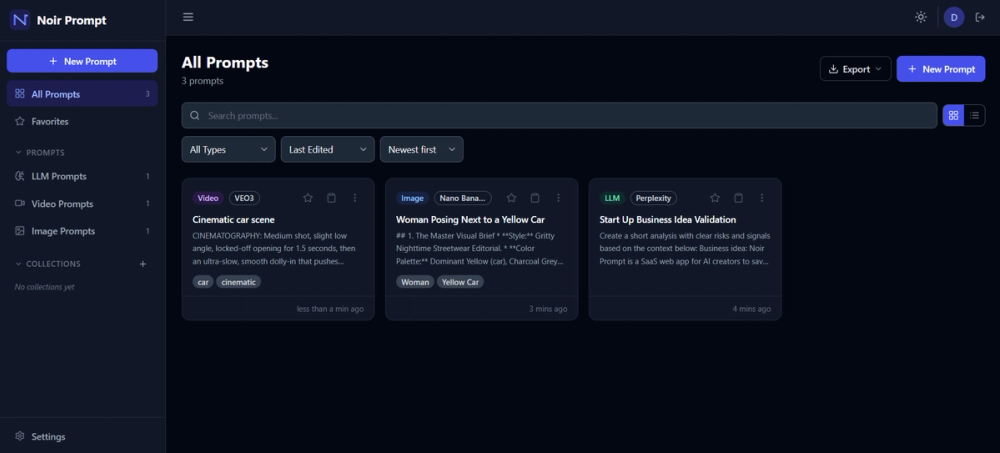
The public pages describe a focused workflow: save a prompt, give it a title, pick the AI model, add tags, search or filter later, then reuse or iterate from the saved version. Screenshots and page copy show areas such as All Prompts, Discover, Recycle Bin, Favorites, Collections, Portfolio, AI Tools, Enhance Prompt, Extension, and Settings, which suggests a workspace built around retrieval and reuse rather than a general note-taking interface.
Support information is visible through the contact page. The site lists hello@noirprompt.com and specifically invites general support questions, billing and subscription questions, bug reports, feedback, and feature requests. The pricing evidence also mentions priority support on Pro and dedicated support on Team, so users comparing plans should check the response expectations attached to each support level.
Technical Details
Noir Prompt exposes several technical signals that matter for AI-heavy workflows. The public page names MCP Server integration for Claude Desktop and Cursor, API access on the Pro plan, export formats including JSON, CSV, Markdown, and Text on paid tiers, and a browser extension for saving prompts from AI tools in the browser. These are concrete enough to evaluate if a user wants prompt management to connect with external tools rather than remain a standalone library.
The site also references row-level security in its About page when describing private prompts. That is a visible product statement, not an independent security audit, so organizations with strict data requirements should review the product's terms, privacy policy, access controls, and any security documentation before storing sensitive prompt assets.
Pros and Cons
Pros
- Clear product focus: Noir Prompt is specifically positioned around prompt storage, versioning, organization, and reuse for AI creators rather than trying to cover every productivity use case.
- Strong visible support for visual AI workflows, including references to Midjourney, Runway, Sora, Flux, and Kling.
- Useful workflow details are public, including prompt collections, tags, model filtering, version history, variable templates, exports, MCP Server access, and browser capture.
- Pricing and plan limits are relatively transparent, with a free tier, trial language, annual billing information, and differentiated support levels.
- The MCP and Cursor/Claude positioning may be valuable for users who want prompt access inside active AI-assisted work sessions.
Cons
- Some advanced capabilities, such as MCP Server access, API access, full version history, and unlimited prompt storage, are tied to paid tiers.
- The browser extension and AI tools are described as part of the product direction, but users should confirm current availability and browser compatibility before depending on them.
- Team-oriented features such as RBAC, admin controls, and prompt approval workflow appear on the Team plan, so small teams should check whether those controls match their approval process.
- The public site explains the product well, but technical implementation details beyond named integrations, exports, and access controls are limited.
- Users storing sensitive client prompts should verify privacy, retention, export, and account-access policies rather than relying only on short marketing copy.
FAQ
What is Noir Prompt used for?
Noir Prompt is used to save, organize, version, search, and reuse AI prompts in a dedicated workspace. The site presents it as a prompt library for visual creators and AI-heavy users working with tools such as Midjourney, Runway, Sora, Flux, Kling, Claude, and Cursor.
Who is Noir Prompt best suited for?
It appears best suited for visual AI creators, Cursor and Claude power users, solo AI builders, freelancers, and agencies that reuse prompts across repeated creative or client workflows. It is less likely to matter for someone who only writes occasional one-off prompts and does not need search, versioning, collections, or templates.
What prompt-management features are visible on the public site?
Visible features include prompt collections, model and tag filtering, favorites, version history, variable templates, one-click copy, shared collections, exports, MCP Server access, API access on Pro, and a browser extension workflow. Plan limits determine which of these features are available at each tier.
Does Noir Prompt support Midjourney, Runway, Sora, Flux, and Kling workflows?
The public copy repeatedly names Midjourney, Runway, Sora, Flux, and Kling as target creative tools. Noir Prompt appears to manage the prompts used with those tools rather than replacing the AI generation platforms themselves.
How does Noir Prompt work with Cursor and Claude?
The site says users can connect their prompt library to Cursor and Claude Desktop through a Universal MCP Server and access prompts without switching context. Users who need this workflow should verify the exact setup requirements, supported clients, and plan availability because MCP Server access is tied to higher-tier plan evidence.
Is there a free plan for Noir Prompt?
Yes. The visible pricing evidence lists a Free plan with up to 50 prompts, 3 collections, the last 3 versions per prompt, 3 variables per prompt, JSON export, shared collections, limited Noir Discover access, and 50 AI Credits per month. Paid plans expand prompt limits, collections, version history, export formats, AI credits, support, and technical access.
What should teams check before using Noir Prompt for client work?
Teams should confirm seat limits, shared collection behavior, admin controls, RBAC permissions, prompt approval workflows, export needs, and support expectations. The Team plan mentions several of these controls, but the practical fit depends on how a team reviews, shares, and protects reusable prompt assets.
Does Noir Prompt provide support or a contact route?
Yes. The public contact page lists an email address and categories for general support, billing and subscriptions, and feedback or feature ideas. The pricing evidence also mentions priority support on Pro and dedicated support on Team.
Conclusion
Noir Prompt is a focused prompt workspace for creators and builders who need a more reliable system than scattered notes, documents, and chat histories. Its strongest visible value is the combination of prompt organization, version history, reusable templates, exports, and AI-workflow integrations for people who reuse prompts professionally.
For individual creators, the free plan provides a low-risk way to test whether a dedicated prompt library improves retrieval and reuse. For teams and advanced users, the main decision is whether the paid-plan limits, MCP/API access, support levels, and team controls match the way prompts are actually used in daily work.