Introduction
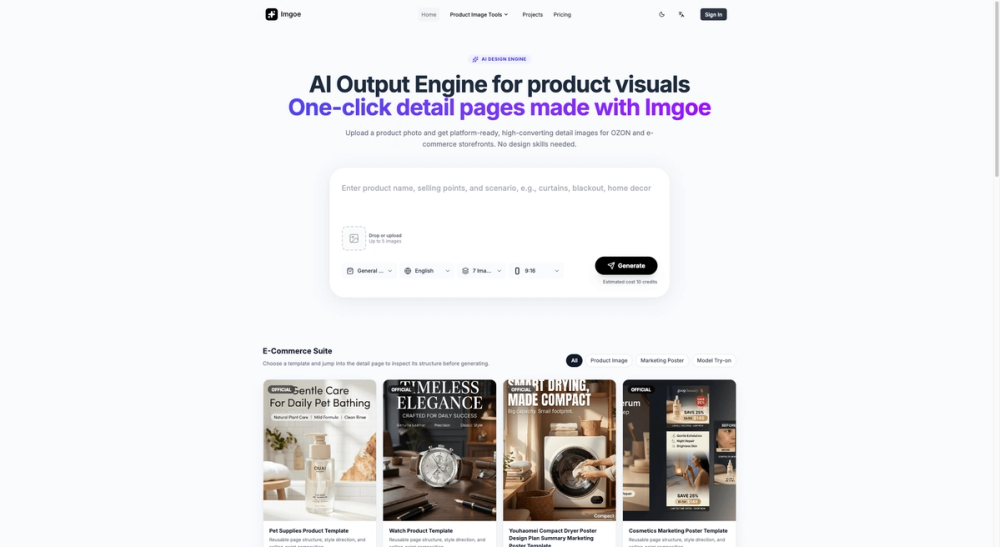
Imgoe is an AI product image generator built for e-commerce sellers who need marketplace-ready visuals without scheduling a studio shoot. The public site presents it as a template-driven visual production tool: you upload a product photo, pick a style direction, and generate product detail images, lifestyle scenes, and model-based assets for platforms like Shopify, Etsy, Amazon, and TikTok Shop. It appears most relevant for small to mid-size online sellers and in-house e-commerce teams who need consistent page imagery across multiple marketplaces but want to avoid repeated creative briefs and long review cycles. Readers should confirm current plan limits and credit costs on the pricing page before committing, since the platform's value depends heavily on matching your product volume to the right tier.
Key Features
- AI product photo generator that turns simple uploads into marketplace-ready product photos, lifestyle scenes, and detail visuals
- AI product image generator with model that creates model-wearing, holding, or using product images without a studio shoot
- Product image generator for producing hero images, selling-point visuals, feature images, comparison images, and detail page assets
- One-click output engine for generating platform-ready detail page image sets from a single product photo
- Template-based Studio workflow with hero, listing, lifestyle, detail close-up, and alternate variation page roles
- Prompt template library for e-commerce product image directions
- Marketplace presets for Shopify, Etsy, Amazon, TikTok Shop, and storefront use
- Aspect ratio options including 1:1, 3:4, 4:3, 9:16, and 16:9
- Task-based billing with a 3-task free trial and add-on packs for extra capacity
Use Cases
Imgoe is built for sellers who need a practical way to turn one product photo into a full set of marketplace-ready visuals. If you sell fashion accessories, beauty products, home goods, food and beverage, or similar categories, the public site suggests Imgoe can help you move from a plain SKU photo to hero images, lifestyle scenes, and model-worn product shots without a full photo production cycle.
It also appears useful for teams managing multiple storefronts who need visual consistency across product pages. The template-based Studio workflow is designed to keep hero images, detail pages, and lifestyle visuals aligned under one style direction, which may reduce the back-and-forth that comes with commissioning separate assets for each listing. That said, the platform's real value depends on how well its AI model output matches your brand's tone and the specific marketplace you sell on.
Pricing
Imgoe prices by task, and every new account starts with a 3-task free trial. A standard task is based on a 5-page set, with extra credit deductions if you choose more than 5 pages. Annual billing is available on all recurring plans. The pricing page lays out current tiers and add-on options.
- Basic: 30 tasks per month (360 per year), annual billing, recommended starter tier
- Pro: 80 tasks per month (960 per year), annual billing, $182/year (approximately $15.17/month, billed yearly), described as the recommended plan with a 20% saving
- Business: 200 tasks per month (2400 per year), annual billing, $374/year (approximately $31.17/month, billed yearly), described as suitable for sustained scale
- Add-ons: one-time task packs (e.g., 20 tasks or 60 tasks) for temporary bursts, with no expiration by default
The public site also mentions that Imgoe does not require design skills and frames the tool as a practical production workflow rather than a general-purpose image generator. Check the pricing page for current per-task credit costs, resolution limits, and any changes to add-on pricing.
User Experience and Support
The public site emphasizes a template-first workflow: upload a product photo, select a marketplace preset, choose your aspect ratio, and generate image sets through the Studio interface. Before-and-after examples on the AI product photo generator page show simple seller inputs transformed into lifestyle and studio-style scenes, which suggests the tool is designed for users who want structured output rather than open-ended creative exploration.
Support evidence on the public pages is limited. The site mentions email support and an FAQ section, but detailed support response times or dedicated account management are not clearly visible. Readers with ongoing production needs should verify what level of support comes with each plan and whether priority assistance is available on higher tiers.
Technical Details
Imgoe is a web-based AI visual production tool with a template-driven Studio workflow. The public site describes it as an output engine for e-commerce visuals, generating product detail page materials with one click. It supports common aspect ratios (1:1, 4:3, 3:4, 9:16, 16:9) and outputs images sized for store and marketplace workflows.
The platform appears to emphasize template consistency and iterative refinement over purely generative exploration. Public testimonials describe it as functioning more like a visual production workspace than a random image generator, with template style, references, and iterative edits built into the workflow. Shopify is explicitly mentioned as a supported platform integration, though the public site also references compatibility with Etsy, Amazon, and TikTok Shop.
Pros and Cons
Pros
- Focused specifically on e-commerce product imagery, not general-purpose AI image generation
- Template-based Studio workflow helps keep product page visuals consistent
- Supports model-wearing product images without a studio shoot
- Marketplace presets for Shopify, Etsy, Amazon, and TikTok Shop reduce format guesswork
- Task-based billing with a free trial and add-on packs for flexibility
- Multiple aspect ratios and page roles for different listing surfaces
Cons
- Support details beyond email and FAQ are not clearly documented on the public pages
- The task-based pricing model may require careful volume planning to avoid overages
- AI model output quality may vary by product category and source image quality
- Annual billing appears to be the primary billing option for recurring plans
- Readers should verify resolution limits, credit costs per image type, and add-on pricing before committing
FAQ
What does Imgoe actually generate for e-commerce sellers?
Imgoe generates product photos, lifestyle scenes, model-wearing product images, hero visuals, detail page assets, comparison images, and selling-point visuals from a simple product upload. The public site frames it as an output engine for marketplace-ready product page imagery rather than a general creative image tool.
How does the task-based pricing work?
Every new account starts with a 3-task free trial. A standard task is based on a 5-page set, and choosing more than 5 pages deducts extra credits based on the actual generated count. Plans range from Basic (30 tasks/month) to Business (200 tasks/month), with one-time add-on packs available for temporary bursts.
Can Imgoe generate product images with AI models wearing or using the product?
Yes. The public site describes an AI product image generator with model feature that creates model-based product images for hero shots, listing photos, lifestyle scenes, detail close-ups, and alternate model variations without requiring a physical studio shoot.
Which marketplaces does Imgoe support?
The public site explicitly mentions Shopify, Etsy, Amazon, and TikTok Shop. Marketplace presets adjust scene direction, language, aspect ratio, and prompt constraints to align with how sellers publish product photos on each platform.
Is there a free trial or free plan available?
Yes. Every new account starts with a 3-task free trial that requires no credit card. This lets you test the workflow and evaluate output quality before purchasing a recurring plan or add-on pack.
How does Imgoe differ from a general-purpose AI image generator?
The public site positions Imgoe as a template-driven visual production workspace for e-commerce rather than an open-ended creative generator. It emphasizes structured output: hero images, detail pages, lifestyle scenes, and selling-point visuals built around one product input, with consistency across multiple generated assets.
What should sellers verify before relying on Imgoe for their product pages?
Confirm the current per-task credit costs, resolution limits, and whether the AI model output style matches your brand and marketplace requirements. Also check the latest plan details and support terms on the pricing page, since task allocations and add-on pricing may change.
Conclusion
Imgoe offers a focused approach to e-commerce product imagery: upload a photo, choose a template direction, and generate a set of marketplace-ready visuals designed to keep your product pages consistent. It is most relevant for sellers and small teams who need structured output across multiple storefronts without the overhead of traditional photo production. Start on imgoe.com to test the free trial, and review the current pricing page before committing to a plan.