Introduction
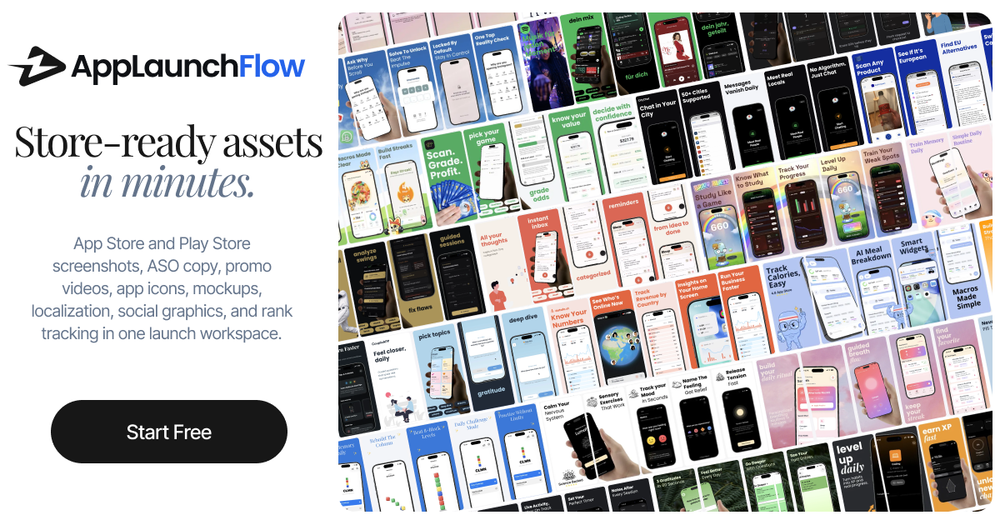
AppLaunchFlow is an all-in-one launch asset workspace for iOS and Android developers who need App Store and Play Store screenshots, promo videos, ASO copy, app icons, mockups, localization, social graphics, and keyword tracking. The platform turns raw screenshots into a complete launch kit, removing the need to juggle separate design, video, and copy tools when preparing a store listing.
Built by an independent developer, the tool positions itself as a fast, repeatable workflow for teams that ship frequently and need store assets to keep pace with their release cadence rather than becoming a bottleneck between code and storefront.
Key Features
- Screenshot editor with AI layouts: Upload raw screenshots and receive AI-generated layout drafts with benefit-led copy, device frames, and customizable styles. Edit everything in a visual editor with undo, redo, and auto-save.
- Promo video generation from screenshots: Upload screenshots and let AI build a storyboard with scenes, transitions, and copy. Export for App Store, Google Play, TikTok, Instagram Reels, and YouTube in MP4 or WebM.
- ASO copy with competitor analysis: Generate promotional text, descriptions, and keywords tuned for discoverability. AI references up to 5 competitor apps and explains why each line works, with per-field insights.
- App icon studio: Describe your app or upload a logo, generate AI icon concepts, then refine them in a layered editor. Export pixel-perfect iOS and Android icons with Default, Dark, and Tinted appearances.
- Localization across 25+ languages: Translate screenshots and store copy with one click. Layouts adapt automatically for longer text in different languages.
- MCP integration for terminal-based design: Connect AppLaunchFlow to AI coding assistants like Claude Code, Cursor, and Codex via MCP to create and edit screenshots without leaving your development workflow.
Use Cases
Indie developers and small teams preparing for an app launch can use AppLaunchFlow to go from raw phone screenshots to a polished, store-ready launch kit without hiring a designer. The three-step workflow (upload, edit, export) keeps the process fast enough to fit into a release sprint, and the repeatable template system means updates between versions do not require starting from scratch.
Teams running frequent releases benefit from the ability to keep store assets aligned with what actually shipped. The platform's approach of converting release notes into benefit-led screenshot copy helps bridge the gap between technical updates and user-facing messaging. For teams already using tools like TestFlight, Firebase, RevenueCat, or Google Play Console, AppLaunchFlow fills the specific store-asset row in their launch checklist.
Pricing
AppLaunchFlow offers a free tier that lets you build and preview an entire project with all features, though exports are preview-only until you upgrade. The Launch Pass provides 7 days of full access with unlimited exports across all asset types for a one-time payment of 9 euros, with the option to credit that amount toward a monthly Unlimited subscription. The Unlimited plan offers unlimited projects, exports, translations, keyword tracking, and store connections, billed monthly or annually with a 45% discount on annual billing. No credit card is required to start.
User Experience and Support
The platform is built and maintained by an independent developer named Yannick, who reads feedback messages directly and uses them to shape the product roadmap. The about page and contact page both provide direct access to the founder. For technical questions, the site offers a blog, and the MCP documentation is available for developers integrating the tool into their terminal workflows. The tool is designed to be accessible without design experience, and the onboarding process starts with a free project that requires no payment information.
Technical Details
AppLaunchFlow supports both iOS and Android store requirements, generating all required screenshot sizes for App Store Connect and Google Play Console. The platform uses AI for layout generation, copy writing, video storyboarding, and icon concept creation, while keeping everything editable in a visual editor. The MCP integration allows terminal-based screenshot design through Claude Code, Cursor, and Codex. Store connections enable direct publishing to App Store Connect and Google Play Console, along with A/B testing for screenshot variants. The tool also integrates with Figma for design workflows.
Pros and Cons
Pros
- Covers the full store-asset workflow in one tool, from screenshots to promo videos to ASO copy to icons
- Free tier lets you build and preview everything before committing to a paid plan
- The Launch Pass one-time payment model is practical for single-launch developers
- MCP integration is a meaningful differentiator for developer-led teams
- Direct founder access for feedback and support
Cons
- The platform is built by a solo developer, which may raise concerns about long-term support and feature velocity for teams that need guaranteed response times
- The free tier limits you to one completed project with preview-only exports, so evaluating the tool at scale requires upgrading
- Keyword tracking and store connections are only available on the Unlimited plan, not on the Launch Pass
FAQ
What is AppLaunchFlow and who is it for?
AppLaunchFlow is a launch asset workspace for app developers. It turns raw screenshots into App Store and Play Store screenshots, promo videos, ASO copy, icons, and social graphics. It is designed for developers and small teams who want to prepare store listings quickly without relying on separate design or video tools.
How does the three-step workflow work?
You upload raw app screenshots, review and refine AI-generated layouts and copy in the visual editor, then export all required sizes for App Store and Google Play. The AI handles the initial layout and copy generation while you retain full editing control.
Can I use AppLaunchFlow for free?
Yes. You can build and preview an entire project with all features for free. Exports are preview-only until you upgrade to a paid plan. No credit card is required to start.
What does the Launch Pass include?
The Launch Pass gives you 7 days of full Pro access with unlimited exports across screenshots, graphics, mockups, icons, and promo videos. It is a one-time payment of 9 euros with no subscription, and the amount can be credited toward a monthly Unlimited plan if you upgrade.
Does AppLaunchFlow support localization?
Yes. The platform translates screenshots and store copy into 25+ App Store languages with one click, and layouts adapt automatically for longer text in different languages.
Can I publish directly to the app stores?
Yes. AppLaunchFlow supports direct publishing to both App Store Connect and Google Play Console, along with A/B testing for screenshot variants. These features are available on the Unlimited plan.
What makes AppLaunchFlow different from using Figma or Canva for screenshots?
AppLaunchFlow is purpose-built for the app store workflow, with AI-generated layouts, benefit-led copy from release notes, device frame libraries, multi-format export, and store connections baked in. Figma and Canva are general-purpose tools that require more manual setup for this specific use case.
Conclusion
AppLaunchFlow addresses a real pain point for developers who ship frequently but find store assets lagging behind their release cycle. The combination of AI-assisted screenshot generation, promo video creation, ASO copy, and direct store publishing in one workspace makes it a practical choice for indie developers and small teams. The free tier and one-time Launch Pass option lower the barrier to trying it, and the MCP integration for terminal-based design is a notable feature for developer-led workflows. For teams evaluating the tool, testing the free tier with an actual project is the most direct way to assess whether the output quality and workflow speed match their needs.