Introduction
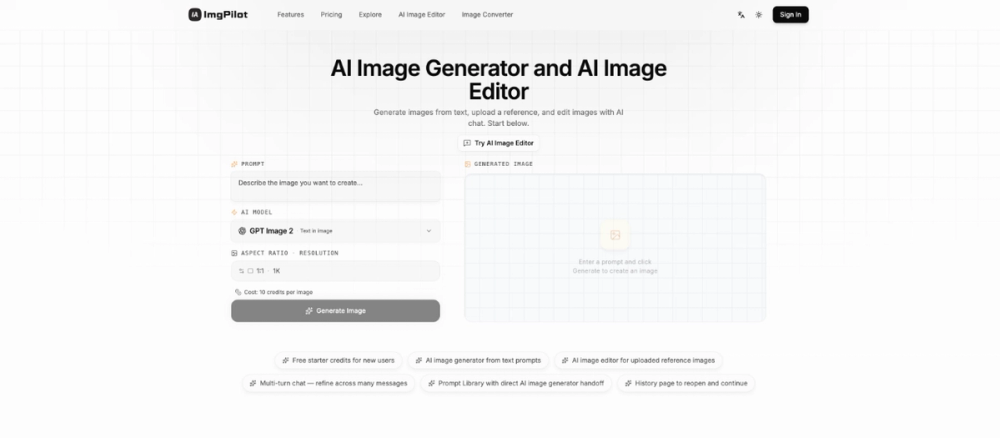
ImgPilot is an AI image generator and editor that combines text-to-image generation with chat-based iterative editing in a single interface. The platform gives users access to eight leading AI image models - including OpenAI, Google's Imagen, and multiple Flux variants - and supports two core workflows: generating images from text prompts, and refining uploaded reference images through natural-language conversation. New users start with 20 free credits, and a prompt library offers pre-built templates for product photos, avatars, posters, and more. For creators who want both generation and editing without switching between multiple tools, ImgPilot covers both paths.
Key Features
- Text-to-Image Generation - write a single sentence, pick a model and format, and generate a finished image without prompt engineering
- Chat-Based Image Editing - upload a reference image or refine a generated one by describing what to add, remove, restyle, or fix; each edit builds on the previous result
- 8 AI Image Models - access OpenAI (sharp detail, balanced color), Google Imagen (strong realism), Flux Pro/Max/Schnell (varying fidelity and speed), Ideogram (text rendering), and Recraft (stylized editorial) under one roof, switching models without switching apps
- Prompt Library - pre-built prompt templates for product photos, pixel art portraits, anime illustrations, emoji mosaic effects, and 3D scenes, with direct handoff to the generator
- Multi-Resolution Export - output up to 4K resolution on higher-tier plans
- Chrome Extension (Prompt Lens) - browser extension for quick access to generation and editing
- History Page - reopen and continue past generations across sessions
Use Cases
Content creators producing product shots, thumbnails, posters, and concept art can generate a first draft from a text prompt in seconds, then refine specific elements - background, lighting, text overlays - through the chat-based editor without starting over each time. The iterative approach is particularly useful when the first output is close but not quite right.
Social media managers creating avatar art, emoji mosaic portraits, and stylized character illustrations can use the prompt library's pre-built templates for pixel art, anime, and emoji effects. These templates lower the barrier for users who have a visual idea but are not experienced prompt engineers.
Designers who already have a reference image - a rough sketch, a brand photo, or a competitor's layout - can upload it and guide the AI through targeted edits: change the color palette, remove a background element, adjust the composition. Because each edit builds on the previous result, the workflow avoids the common problem of having to re-describe the entire scene from scratch after each change.
Pricing
ImgPilot offers monthly and yearly subscription tiers plus one-time credit packs that never expire:
- Basic - $7.99/month: 400 credits, all AI models, text-to-image and chat editing, prompt library access, standard resolution (1K), 7-day generation history
- Pro - $12.99/month: 800 credits, everything in Basic plus high resolution (up to 2K), 30-day generation history, share-and-earn bonus credits
- Ultra - maximum quality, permanent history, and priority access (pricing visible on the pricing page)
- One-Time Credit Packs - purchase credits that never expire, suitable for users who create intermittently rather than monthly
Yearly billing is available at a discount. New users receive 20 free starter credits to test the full workflow before committing.
User Experience and Support
The two-path workflow is straightforward: choose text-to-image generation when you have an idea, or the reference-image editor when you have a starting image. Each path follows a three-step flow - describe, generate, refine - that keeps the process manageable even for first-time users.
The prompt library gives newcomers proven starting points for common image types, reducing the trial-and-error that often comes with AI image tools. The history page lets users reopen past generations and continue editing, which is useful for iterative projects that span multiple sessions.
The site lists a Support section and an About & Methodology page, though specific support channel details (response times, contact methods) are not prominently visible on the pages fetched.
Technical Details
ImgPilot runs as a web application with a Chrome extension (Prompt Lens) for browser-level access. The platform routes generation requests to eight AI models: OpenAI (balanced detail), Flux Pro (high fidelity), Flux Max (maximum fidelity for hero images), Flux Schnell (fast photoreal drafts), Google Imagen (realism and web-grounded prompts), Ideogram (text rendering and layout), Recraft (stylized editorial), and an additional model for multi-resolution export up to 4K. The site supports English and Chinese. New models are added as providers launch them.
Pros and Cons
Pros
- Combines text-to-image generation and chat-based editing in one tool
- Eight AI models accessible from a single interface, no need to switch platforms
- Prompt library with pre-built templates reduces the learning curve
- Iterative editing builds on previous results instead of starting from scratch
- Free starter credits and one-time credit packs that never expire offer flexible payment
Cons
- Credit-based pricing means heavy users need to monitor usage carefully
- Support contact details and response times are not clearly listed on the fetched pages
- Resolution and history retention vary by plan tier - Basic is limited to 1K and 7 days
- Chrome extension is the only listed browser integration; no Firefox or Safari equivalents mentioned
FAQ
What is ImgPilot and how does it work?
ImgPilot is an AI image generator and editor that lets you create images from text prompts or refine uploaded reference images through natural-language conversation. You can switch between eight AI models, use pre-built prompt templates, and iterate on results without re-describing the entire scene each time.
How is the image editor different from the generator?
The text-to-image generator creates a new image from a single prompt. The editor takes an existing image - either one you generated or one you uploaded - and lets you refine it through multi-turn chat, where each edit builds on the previous result. The editor is recommended when you already have a starting point and want to make targeted changes.
How many AI models does ImgPilot support?
Eight models are currently available: OpenAI, Google Imagen, Flux Pro, Flux Max, Flux Schnell, Ideogram, Recraft, and one additional model. ImgPilot routes your request to the chosen model automatically, and new models are added as providers release them.
What happens when I run out of credits?
You can purchase one-time credit packs that never expire, or upgrade to a higher subscription tier for more monthly credits. The Basic plan includes 400 credits per month, Pro includes 800, and Ultra offers the highest allocation. Heavy users should compare the credit-per-dollar ratio across tiers before committing.
Can I edit an image I generated earlier?
Yes. ImgPilot includes a history page where you can reopen past generations and continue editing. The retention period depends on your plan: 7 days on Basic, 30 days on Pro, and permanent on Ultra.
Does ImgPilot have a free trial?
New users receive 20 free starter credits, which is enough to test the full generation and editing workflow. No credit card is required for the free credits.
What resolution can I export at?
Basic plan users can export at standard resolution (1K). Pro users get up to 2K, and Ultra supports multi-resolution export up to 4K. The resolution limit is one of the main differences between tiers.
Conclusion
ImgPilot brings together AI image generation and iterative chat-based editing in a way that most competitors handle separately. Having eight models under one interface - with the ability to switch between them mid-project - is a practical advantage for creators who work across different visual styles. The prompt library lowers the entry barrier, and the credit-pack option alongside subscriptions gives intermittent users a cost-effective alternative to a fixed monthly plan. Anyone evaluating AI image tools should test the free credits against their typical workflow to see whether the generation-plus-editing combination fits their needs.